Cheap Facebook leads aren't automatically bad, and expensive search leads aren't automatically good. The mistake is judging either channel at the form-submission stage. A law firm can buy a low-cost inquiry that never answers, doesn't fit the firm's jurisdiction, creates a conflict, or never becomes a retained matter. It can also pay more for a search inquiry that arrives with stronger intent but still fails during intake.
Facebook advertising for attorneys works when the firm treats Meta as a complete acquisition system, not as a boosted post. The system includes the ad, the landing page or lead form, consent language, comments, Messenger, CRM routing, human follow-up, attorney approval, and revenue measurement. Bar compliance isn't a disclaimer added at the end. It's a launch gate that governs every connected handoff.
Table of Contents
Why Facebook Still Matters for Law Firms
The popular advice says Facebook leads are worthless because they're cheap and low-intent. That conclusion confuses low cost per form with low business value. Facebook isn't Google Search, and it shouldn't be forced to behave like it.
Meta reported 3.07 billion monthly active Facebook users as of December 31, 2023. The company also reported approximately $196.18 billion in advertising revenue during 2025, about 97.6% of total revenue, figures that establish Facebook as a major distribution channel rather than merely a place to maintain a firm profile. See the Meta statistics summary for the reported figures.
That scale helps a firm introduce estate planning, family law, immigration, or real estate law to people before they actively search. Educational content can explain a legal issue, retarget people who engaged with it, and give the firm a place in the prospect's consideration set. A person scrolling through a feed may not be looking for counsel yet, but the right explanation can help them recognize that a legal problem deserves attention.
The trade-off is qualification. Audience size creates opportunity, not demand. Facebook can use geographic, demographic, interest, engagement, and first-party audience strategies, but those controls won't turn a broad audience into a qualified caseload by themselves. Practice-area-specific messaging, a credible next step, and disciplined intake do that work.
Practical distinction: Google often captures an existing legal need. Facebook can create recognition of a need. The first channel usually starts closer to consultation, while the second needs stronger education and follow-up.
A firm should consider Facebook when it has a clear service market, a repeatable intake process, useful educational material, and enough operational capacity to respond promptly. It shouldn't launch just because another firm has a Facebook page or because a platform report shows inexpensive clicks. Attorneys comparing channel roles can also review these Facebook lawyer tips from AdManage.ai alongside the broader case for legal digital marketing for lawyers.
Bar Rules Apply Before You Ever Launch
A Facebook page used to market legal services is still attorney advertising. Platform approval doesn't replace professional-conduct review, and a disclaimer can't rescue a misleading promise.
The State Bar of Michigan explains that a lawyer or law firm is responsible for content appearing on its Facebook page. It also states that a social-media account established to market legal services is subject to advertising ethics rules, including Michigan Rule of Professional Conduct 7.1, and that targeted advertising may be used when it complies with applicable Rules 7.1 through 7.4. The State Bar of Michigan Facebook ethics guidance is a useful reference point, although the controlling requirements vary by jurisdiction.
The District of Columbia guidance similarly treats social content promoting a lawyer or firm as subject to truthfulness and attorney-advertising requirements under Rule 7.1. A campaign spanning multiple states therefore needs a jurisdiction-aware review, not one universal disclaimer pasted into every asset.
Use a six-step approval gate
Run every campaign through the same documented process:
- Identify the jurisdiction. Confirm where the firm may advertise and which rules govern the audience, offer, testimonials, results language, and required labels.
- Review every claim. Check headlines, primary text, video scripts, lead-form copy, landing pages, comments, and automated replies for guarantees, comparisons, “specialist” language, or statements the firm can't substantiate.
- Add required disclaimers. Place them where local rules require them. Don't assume a small footer on the landing page covers a video, form, or Messenger exchange.
- Preserve the record. Save the approved creative, landing-page version, targeting settings, consent language, and revision history.
- Obtain attorney approval. Document who reviewed the assets and when approval occurred. Approval should cover the connected conversion path, not only the image in Ads Manager.
- Audit active campaigns. Review ads, comments, direct messages, and automated follow-up periodically. Pause and reapprove whenever the offer, audience, creative, or landing page changes.
The recurring failures are predictable. Ads imply a certain result, past outcomes appear typical, material limitations disappear from the message, or a testimonial reveals confidential information. A public comment can also invite individualized legal advice or imply an attorney-client relationship if staff answer carelessly.
For firms updating their broader social workflow, this Facebook and Instagram ads update is a relevant operational reference. The central rule remains simple: the firm owns the communication, even when Meta hosts it.
Targeting One Practice Area at a Time
The fastest way to make Facebook vague is to advertise the entire firm to everyone in the service area. Start with one practice area and one geographic market. That constraint gives the platform a clear offer and gives the intake team a manageable definition of a good inquiry.
Suppose a solo estate-planning attorney serves a defined local market. The first campaign might promote an educational guide about wills and trusts, while a separate campaign asks people to schedule a consultation. The two campaigns shouldn't share the same success definition. The educational campaign builds engagement and retargeting pools. The consultation campaign seeks a direct action from people who already understand the problem.
Build the audience in layers
Use the following sequence in Ads Manager:
- Geography: Include only locations where the attorney practices. If the firm works remotely, confirm that the service model and bar rules support the selected locations.
- Demographics: Use demographic controls only when they fit the legal offer and remain permitted. Don't treat age or household assumptions as proof of legal need.
- Interests: Test relevant interests as hypotheses, not as guaranteed indicators. An interest can describe content consumption rather than a person's eligibility.
- Engagement: Retarget people who watched a video, visited a page, interacted with a post, or opened a form. These audiences have shown attention, but they still need qualification.
- First-party audiences: Where consent and applicable rules permit, use appropriately collected CRM or website audiences for follow-up and suppression. Keep documentation for how the audience was created.
Separate “schedule consultation” from lower-intent education in distinct campaigns or ad sets. If both objectives run together, inexpensive engagement can obscure whether the consultation path is producing useful matters.
Record the campaign name, practice area, geography, audience inputs, exclusions, creative angle, landing page, and conversion event. This documentation distinguishes actual controls from delivery suggestions and lets the firm reproduce or audit the setup later. For a deeper comparison of audience approaches, see Original Audiences versus Advantage Audiences on Meta.
Creative and Special Ad Category Mechanics
Creative has two jobs in legal campaigns. It needs to earn attention without making an impermissible promise, and it needs to help the right person recognize the relevant legal issue without asserting a sensitive personal attribute about them.
Avoid “We guarantee results,” “the best attorneys in the state,” or “you will win your case.” Those phrases create outcome, superiority, or certainty problems unless the firm can substantiate the claim and the jurisdiction permits the wording. Replace them with a neutral explanation of the issue, the firm's service, and the next step.
A useful test matrix includes at least three distinct creative angles:
- Education: Explain a common legal question in plain language.
- Problem recognition: Describe a situation the firm handles without declaring that the viewer has it.
- Process clarity: Show what a consultation covers and what information the firm needs to assess next steps.
The landing page must preserve the same meaning. A cautious ad shouldn't lead to a page promising certainty, and a compliant disclaimer shouldn't be buried after an aggressive headline.
Check category classification first
Meta lists Special Ad Categories as housing, employment, credit, and issues, elections, or politics. An ordinary legal-services campaign isn't automatically placed in one of these categories, but a campaign involving housing, credit, employment, or social and political issues may trigger restricted targeting. Classification should reflect the campaign's subject, not the firm's general practice label.
| Setting | Ordinary Legal Campaign | Special Ad Category Campaign |
|---|---|---|
| Category declaration | Declare NONE or use an empty category array when applicable | Select the relevant category and country |
| Age targeting | Minimum targetable age 13, ordinary maximum 65 | Restrictions may limit ordinary demographic controls |
| Geographic planning | Up to 250 cities, 200 regions, and 50,000 ZIP codes are listed in Meta's general targeting documentation | Housing, employment, and credit campaigns may have restricted geographic options |
| Audience design | Geographic, demographic, interest, engagement, and first-party strategies where permitted | Use the restricted options available for the selected category |
These limits come from Meta's targeting restrictions documentation. Check eligibility before building the audience. A campaign can be professionally compliant and still fail operationally if its settings don't match the category.
Landing Pages and Lead Capture That Actually Reach Intake
An ad doesn't generate a business result. It creates a handoff. The handoff fails when the ad promises one thing, the form asks for another, the CRM receives incomplete data, or nobody owns the next response.
Map each ad to a dedicated landing page or native lead form. The page should repeat the practice area and offer in clear language, then ask only essential qualification questions. Extra fields increase friction without necessarily improving screening. Neutral questions also reduce the chance that a prospect publishes sensitive case details in a form, comment, or direct message.
Design the handoff before buying traffic
A reliable conversion path has explicit ownership:
- Ad: States the legal issue and appropriate next step without promising an outcome.
- Landing page or form: Matches the ad and explains what information is collected and how it will be used.
- Qualification: Requests only information needed for initial screening.
- CRM: Stores source, campaign, ad, consent, and timestamp fields.
- Routing: Assigns the inquiry to a person or defined intake queue.
- Escalation: Sends urgent matters, complaints, sensitive disclosures, and attorney-client relationship questions to trained staff.
Meta Lead Ads have a technical dependency many firms discover after launch. An application retrieving lead data must undergo App Review, so a CRM or intake integration doesn't automatically receive submissions merely because the form is live. The Meta Lead Ads documentation explains the access requirement. Configure permissions, test data transfer, verify field mapping, and confirm failure alerts before spending.
A human should own urgent matters within minutes, while automated follow-up must use approved language and documented consent. Comments and Messenger need response rules too. Staff shouldn't give individualized legal advice, suggest representation exists, or invite detailed confidential disclosures in public threads.
A trained law firm virtual assistant can support intake coverage when the firm's attorneys or staff can't monitor every submission, but the firm still needs supervision, escalation rules, and approved scripts. The landing page itself should remain focused, as described in this guide to landing pages for law firm consultations.
Measuring What a Lead Is Actually Worth
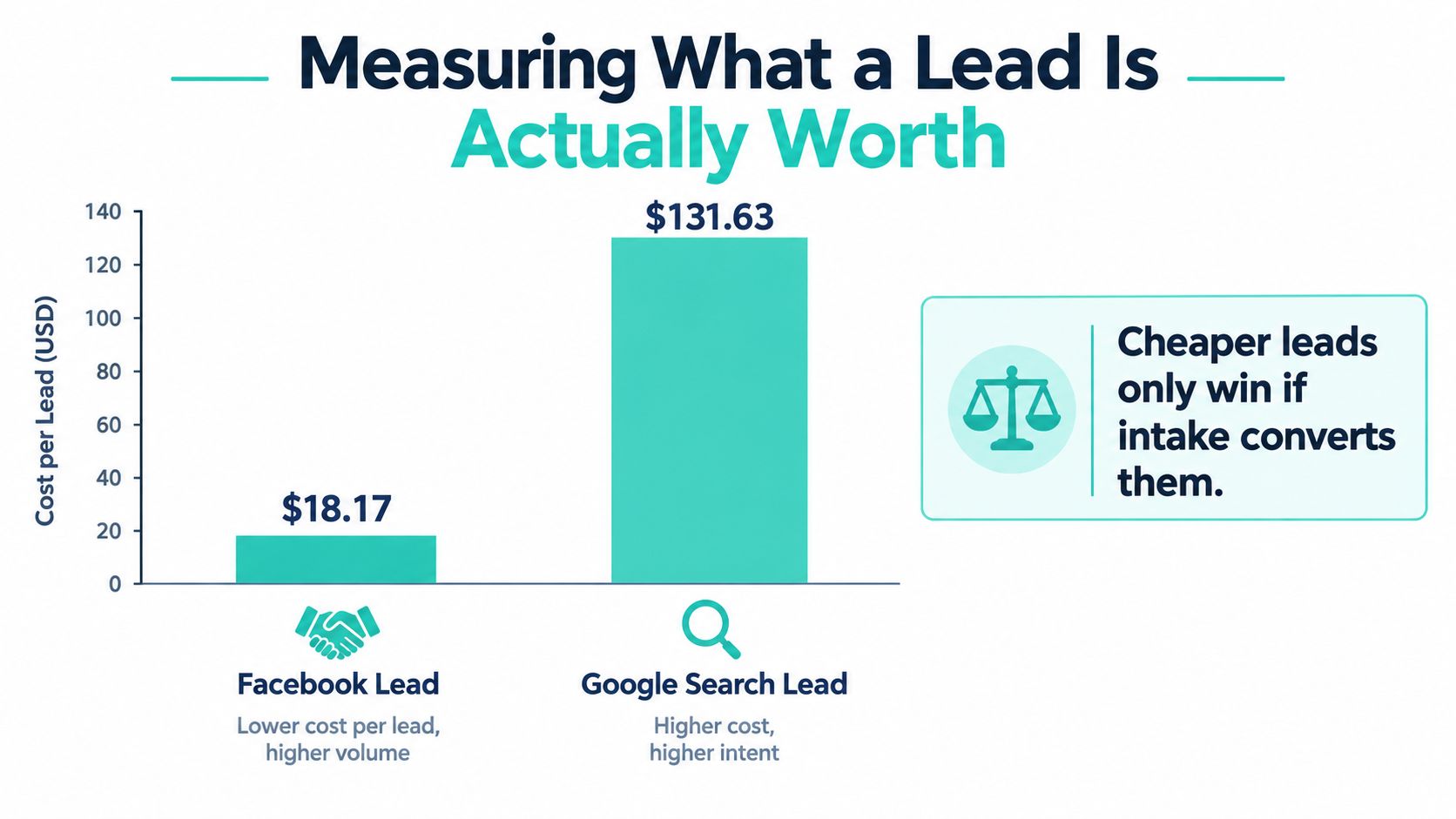
The most tempting comparison in paid media is $18.17 for a Facebook lead versus $131.63 for a Google Search lead. Separate legal-sector reporting based on 726 U.S. lead-objective campaigns from April 2024 to June 2025 cites that comparison, while a 2025 Attorneys & Legal Services benchmark reported a 10.53% conversion rate, $4.10 cost per click, and 2.11% click-through rate for Facebook lead campaigns. These figures are directional, not guarantees. The published legal advertising benchmark notes a specific cohort, objective, geography, and reporting period.
The apparent sevenfold cost advantage can mislead a firm. Cost per form ignores whether the inquiry is complete, duplicated, in the service area, conflict-free, financially appropriate, or responsive. It also ignores whether intake contacted the person quickly enough to create a consultation.
Build a revenue view below the platform
Track the progression in the CRM:
- Valid inquiry
- Screened matter
- Consultation scheduled
- Consultation attended
- Engagement signed
- Expected fee revenue
- Revenue collected
Break those outcomes down by campaign, practice area, ad, and lead-response time. Meta reporting can show delivery and form activity, but it can't be the sole source of truth for retained matters.
Use two core calculations:
- Cost per qualified consultation: campaign spend divided by qualified consultations.
- Cost per retained matter: campaign spend divided by signed engagements.
A low-cost Facebook lead can become attractive when the intake team filters effectively and produces retained matters. It can become expensive when low-friction forms generate incomplete, duplicate, out-of-area, or low-intent inquiries. Search may cost more at the form stage while producing a different level of intent. Compare the channels using the same downstream definitions, attribution window, and revenue treatment.
The useful question isn't “What did the lead cost?” It's “What did the retained matter cost, and what revenue did it produce?”
Bring valid inquiries, screened matters, consultations, signed engagements, expected fees, collected revenue, and response-time data to the next strategy meeting. That conversation changes campaign optimization from “make leads cheaper” to “make the intake system more productive.” Firms looking for a broader measurement framework can use this guide to measure law firm marketing ROI.
A 90-Day Roadmap and Honest Final Assessment
A Facebook campaign should earn the right to scale through evidence, not enthusiasm. Use the first 90 days to establish compliance, test the conversion path, and replace platform-level assumptions with CRM outcomes.
Days one through 14
Complete jurisdiction review, claim and testimonial checks, disclaimer placement, consent language, comment and Messenger rules, version retention, and attorney approval. Confirm that the CRM integration has the required access, that fields map correctly, and that someone owns urgent follow-up.
Days 15 through 42
Launch one practice area in one geographic market. Build separate paths for education and consultation intent, test at least three creative angles, and verify that each ad matches its landing page or native form. Check lead quality manually, not only through Ads Manager.
Days 43 through 90
Optimize toward qualified consultations and retained matters. Review campaign, ad, practice-area, and response-time performance. Pause creative that produces misleading inquiries, campaigns that attract the wrong geography or matter type, and any asset that changes without renewed approval.
Decision checklist
- Measure: Valid inquiries, screened matters, consultations, signed engagements, expected revenue, and collected revenue.
- Approve: Jurisdiction, claims, testimonials, disclaimers, consent, landing page, form, automated follow-up, comments, and CRM handoff.
- Pause: A campaign when the integration fails, staff can't respond, the audience produces persistent conflicts or poor-fit matters, or the creative creates compliance uncertainty.
- Support: Use Facebook to build recognition, education, and retargeting. Use Google Search to capture active demand, and keep referrals and structured follow-up in the mix.
Facebook should support, not automatically replace, search and referrals. The channel is strongest when the firm can explain a specific legal problem, qualify it carefully, route the inquiry reliably, and judge success by retained matters. A compliance-aware managed service such as SimpleLab Digital can coordinate paid media, landing pages, content, and follow-up while keeping attorney review in the launch workflow.
SimpleLab Digital offers Facebook and Instagram campaign management, practice-area-specific landing pages, creative, audience targeting, and ongoing optimization for law firms that want the full intake path connected to paid media. Visit SimpleLab Digital to discuss a compliance-aware campaign built around qualified consultations and retained matters, not just cheap leads.
Built with Outrank app