A lot of estate-planning firms are in the same spot right now. The attorney wants marketing to move faster, the intake team needs access to messages, an outside ad partner needs Page permissions, and nobody wants sensitive client information floating around in the wrong inbox. Then a lead comes in through Facebook, nobody sees it for hours, and the firm loses a consultation it probably should have booked.
That's why Facebook Page administration isn't a side task in marketing for estate planning lawyers. It's part of lead handling, privacy control, and ad performance. If the wrong person has full access, your Page becomes a compliance risk. If the right person lacks access, response time slows down and paid traffic gets wasted. If roles aren't documented, no one can explain who changed what.
Table of Contents
- Start in Meta Business settings
- Choose the minimum role that still lets the work happen
- Confirm access and secure the workflow
Introduction
A common breakdown looks simple on the surface. The managing attorney gives one staff member full Page access years ago. Later, a receptionist starts answering comments, a contractor launches ads, and another assistant tries to pull lead details from Meta tools but can't see the right assets. Meanwhile, prospective clients are asking private questions through Messenger about parents, incapacity planning, and probate fears. The firm has activity, but no clean system.
That's expensive in ways firms don't always see immediately. Research associated with MIT and InsideSales found that responding within 5 minutes made a lead 21 times more likely to qualify than waiting 30 minutes, according to lead response time research summarized by REWORK. Facebook admin setup directly affects whether that speed is even possible.
When firms work on Attorney Assistant marketing leads, they usually focus on campaigns, content, and intake. That's right, but access control sits underneath all three. For a broader strategy view, this guide pairs well with how to market an estate planning law firm.
Practical rule: If someone doesn't need to see lead conversations or change Page settings, don't give them the role that allows it.
Prerequisites
Before you touch Meta Business settings, line up the people, permissions, and internal rules first. This prevents the usual loop of failed invites, duplicate accounts, and accidental over-access.
Confirm ownership and account readiness
Use this short checklist before inviting anyone:
- Verify Page ownership: Make sure the Facebook Page is claimed by the firm's Meta Business account, not a former employee's personal profile.
- Confirm current admin authority: The person making changes needs enough authority in Meta Business and on the Page to assign roles.
- Check profile identity: Each person being added should use their real Facebook profile tied to the email they monitor.
- Review two-factor readiness: If the firm requires stronger account security, every admin-level user should be prepared to pass login verification.
- Match role to job duty: Decide in advance who handles ads, who handles comments, and who can access lead conversations.
Set compliance expectations before access
Estate planning marketing involves messages that can reveal family relationships, incapacity concerns, or financial context. That doesn't mean every staff member should see everything.
Use a simple internal access note that records:
- Who requested access
- Why they need it
- Which assets they need
- Who approved it
- When it should be reviewed or removed
That discipline fits well with campaign planning and paid social setup. If you're building the ad side at the same time, running Facebook and Instagram ads for lead generation campaigns is the right companion read.
Keep legal intake separate from casual social activity. A person who schedules posts doesn't automatically need access to private messages or lead forms.
Setting Admin Access on Facebook Page
The safest way to grant access is through Meta Business tools, not by casually handing over credentials or adding people ad hoc from a phone. That gives your firm a cleaner record of who has access and makes it easier to remove access later.
Here's the visual flow most firms need:
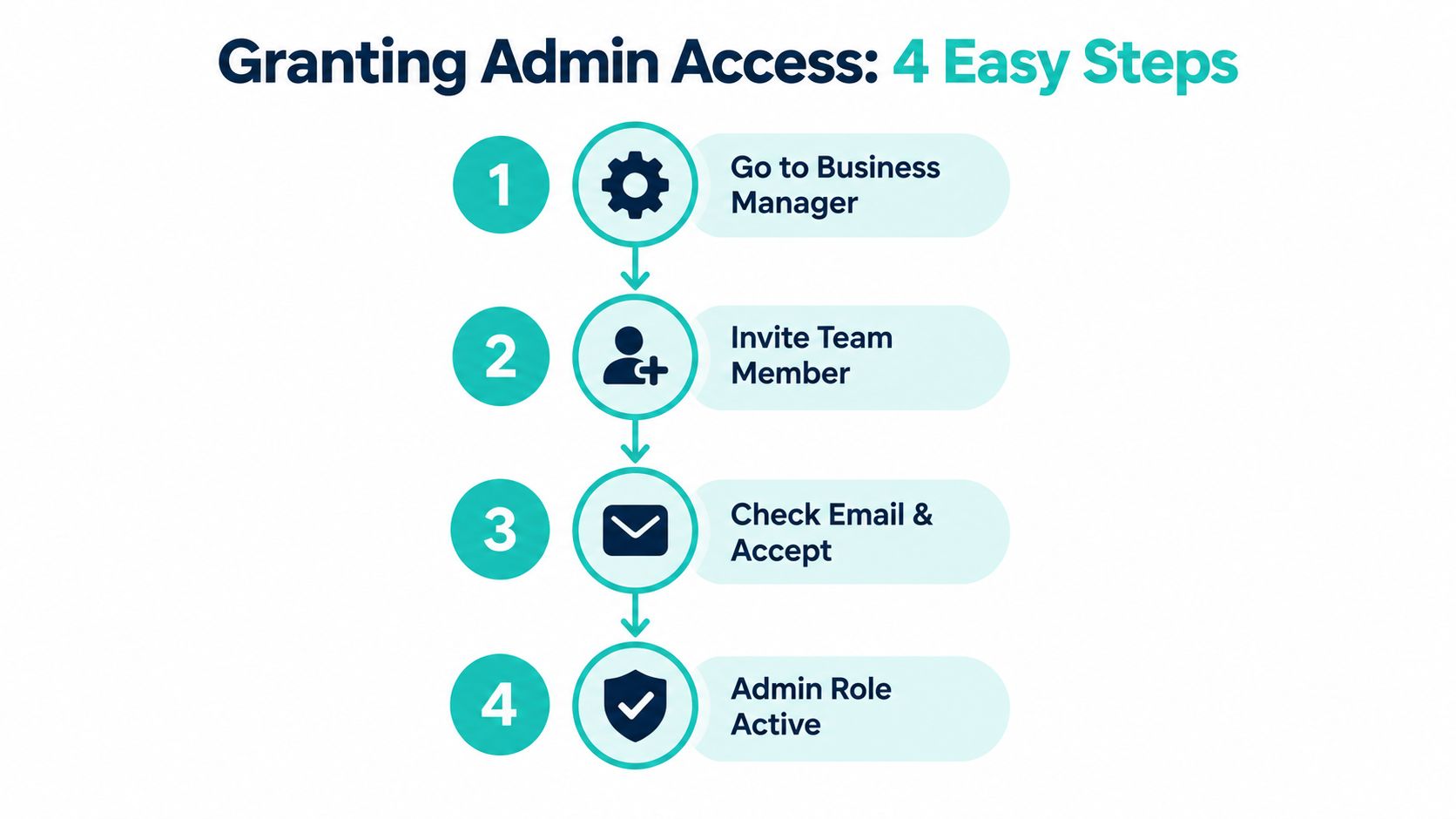
Start in Meta Business settings
Log in to the firm's Meta Business account. Go to the business settings area where Pages, people, and connected assets are managed.
Then work through this order:
- Open the business settings panel: Don't start from the public Page view if you want clean control over business assets.
- Select the Page asset: Find the law firm's Page under business assets.
- Open people or assigned users: This is where you'll see who already has access and what level they hold.
- Choose add or assign access: Enter the correct profile or email-connected identity for the person you're inviting.
At this point, slow down. Many firms assign broad access because it feels easier in the moment. For estate planning, that can create unnecessary exposure to private inquiries.
Choose the minimum role that still lets the work happen
Ask one question before you click save: what specific job does this person need to do this week?
Examples:
- A front-desk or intake coordinator may need message visibility and notification awareness.
- A paid ads specialist may need ad-related access but not full control over Page settings.
- A content manager may need post publishing rights without control over business ownership.
If a contractor is only building campaigns and reporting results, don't default to full admin. Least-privilege access protects both the firm and the contractor.
A compliance-aware firm should also document claims and approvals before campaigns launch. The American Corporate Counsel ethics materials note that lawyer advertising may use many media formats, but it must not be false or misleading, and firms should identify a responsible lawyer where required. That framework is useful when the same team members with Page access also publish ads and testimonials, as outlined in the ACC ethics materials on lawyer advertising controls.
After the invite is sent, the recipient needs to accept it. Some firms get stuck here because they assume the role is active immediately.
To reduce confusion, send the invite and then send an internal message that says:
- Which asset was shared
- What role was assigned
- What tasks they can start once accepted
- Who to contact if access doesn't appear
Later, when you're refining day-to-day publishing and moderation workflows, Facebook and Instagram best practices for 2024 is a useful operational reference.
A short walkthrough helps when training staff on the interface:
Confirm access and secure the workflow
Once the person accepts, verify the assignment from the business settings side. Don't just ask, “Can you see the Page?” Confirm what they can do.
Check these items:
- Can they view or manage messages
- Can they edit Page information
- Can they create or manage ads
- Can they see insights
- Can they change roles for others
If any answer is broader than intended, revise the role immediately. The goal isn't convenience. It's controlled speed.
Fast response only works when the right person gets the alert and knows they own the follow-up.
Understanding Permissions Levels
Not every marketing task deserves admin rights. Estate-planning firms usually need a split between leadership, intake, content, ads, and reporting. Matching those jobs to the correct role lowers risk without slowing work.
Comparison of Facebook Page Roles
| Role | Key Capabilities |
|---|---|
| Admin | Full Page control, including settings, content, messaging, insights, ads, and role management |
| Editor | Can create and edit posts, respond to activity, and manage much of the daily Page activity without full control over role assignment |
| Moderator | Focused on interaction management such as comments and messages, useful for community and intake monitoring |
| Advertiser | Can create and manage ads tied to the Page, suited to paid campaign execution |
| Analyst | Can view insights and performance data without editing content or changing settings |
Which role fits which marketing job
A small firm often needs only a few clean assignments.
- Managing attorney or firm owner: Admin makes sense here because someone inside the firm should control ownership, approvals, and removals.
- Marketing manager: Editor or Admin depends on whether that person must control settings and access, not just content.
- Outside ad buyer: Advertiser is often enough.
- Client intake staff: Moderator may be the safer fit if they need to watch comments and messages.
- Reporting or operations support: Analyst works well when the person only needs visibility into performance.
Estate-planning inquiries often start broad and become personal quickly. The person who posts educational content about wills and trusts isn't always the same person who should read private direct messages.
For firms trying to organize these workflows more deliberately, social media management for law firms gives a broader view of who should own what across channels.
Troubleshooting Common Issues
Even when the setup process is correct, Facebook access problems still show up in familiar patterns. Most of them aren't technical mysteries. They come from account mismatch, pending actions, or assigning the wrong role.
This quick visual can help your team diagnose the issue faster:
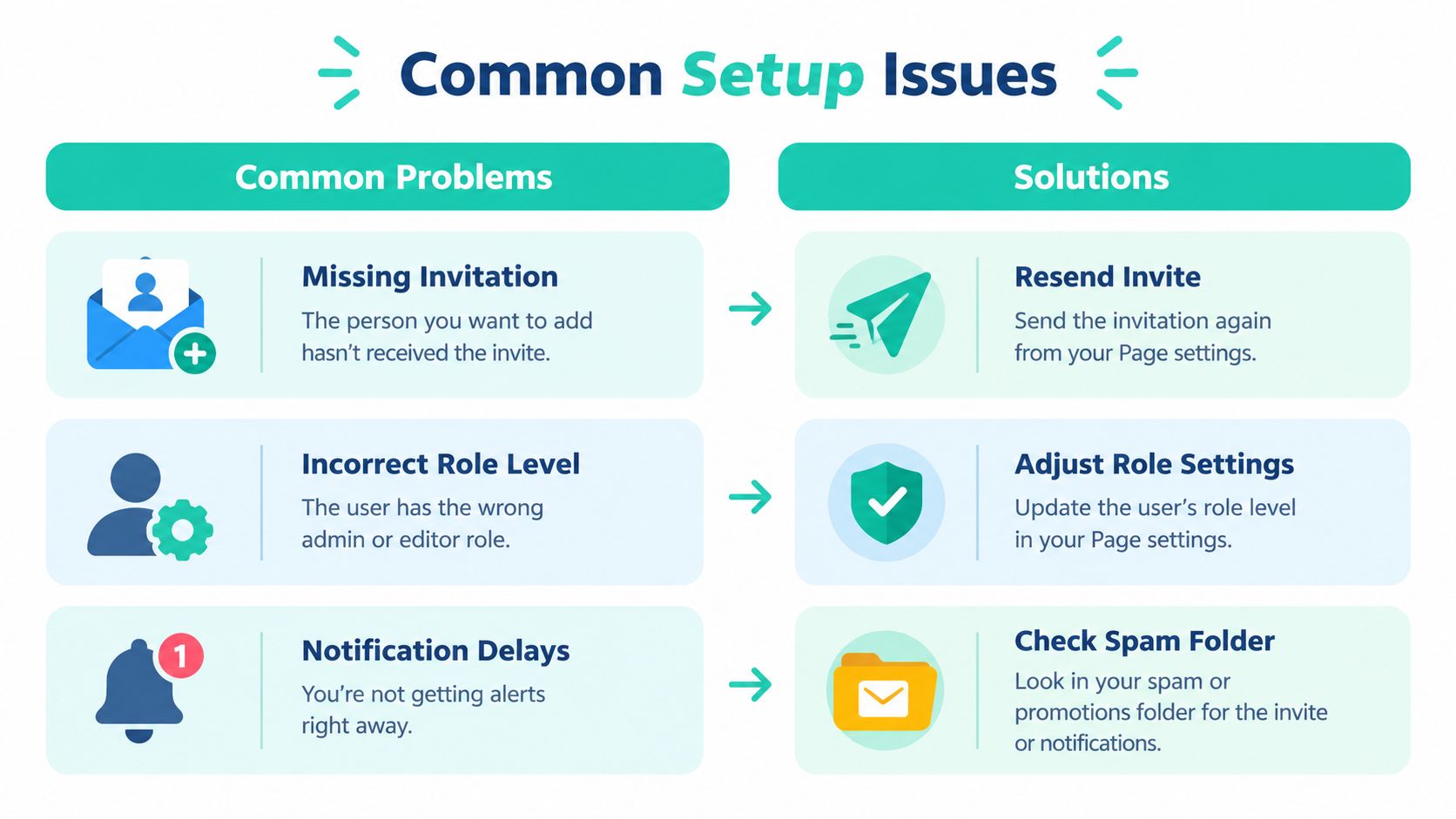
Missing invitation
Symptom: The user says they never received the invite.
Root cause: The invite is pending, was sent to the wrong account identity, or landed in a different email or notification path.
One-line fix: Cancel the pending invite, verify the exact profile, and resend it to the correct account.
Incorrect role level
Symptom: The user can access the Page but can't complete the task they were assigned.
Root cause: The firm gave a narrower role than the job requires, or assigned access at the wrong asset level.
One-line fix: Reopen the person's asset permissions and adjust the role to match the responsibility.
Notification failure
Symptom: The person has access, but nobody is reacting to new comments, messages, or leads in time.
Root cause: Access exists, but notification settings, assignment ownership, or internal handoff rules are unclear.
One-line fix: Turn on relevant alerts, assign a human owner, and document who responds first.
A practical troubleshooting table
| Problem | What to check first |
|---|---|
| Invite not visible | Confirm the recipient's actual Facebook profile and resend |
| Access too limited | Review the assigned Page role against the person's real tasks |
| No one responding | Check notification settings and internal ownership |
| Duplicate confusion | Look for overlapping business accounts or old user access |
A lot of firms treat this as a software issue when it's actually a process issue. If nobody owns Messenger response during office hours, access alone won't fix delayed intake.
Private messages need the same discipline as website forms. Someone must own the first response.
Best Practices and Tips
Good Facebook administration is mostly about restraint. Give people enough access to do the work, then build review habits so permissions don't sprawl over time.
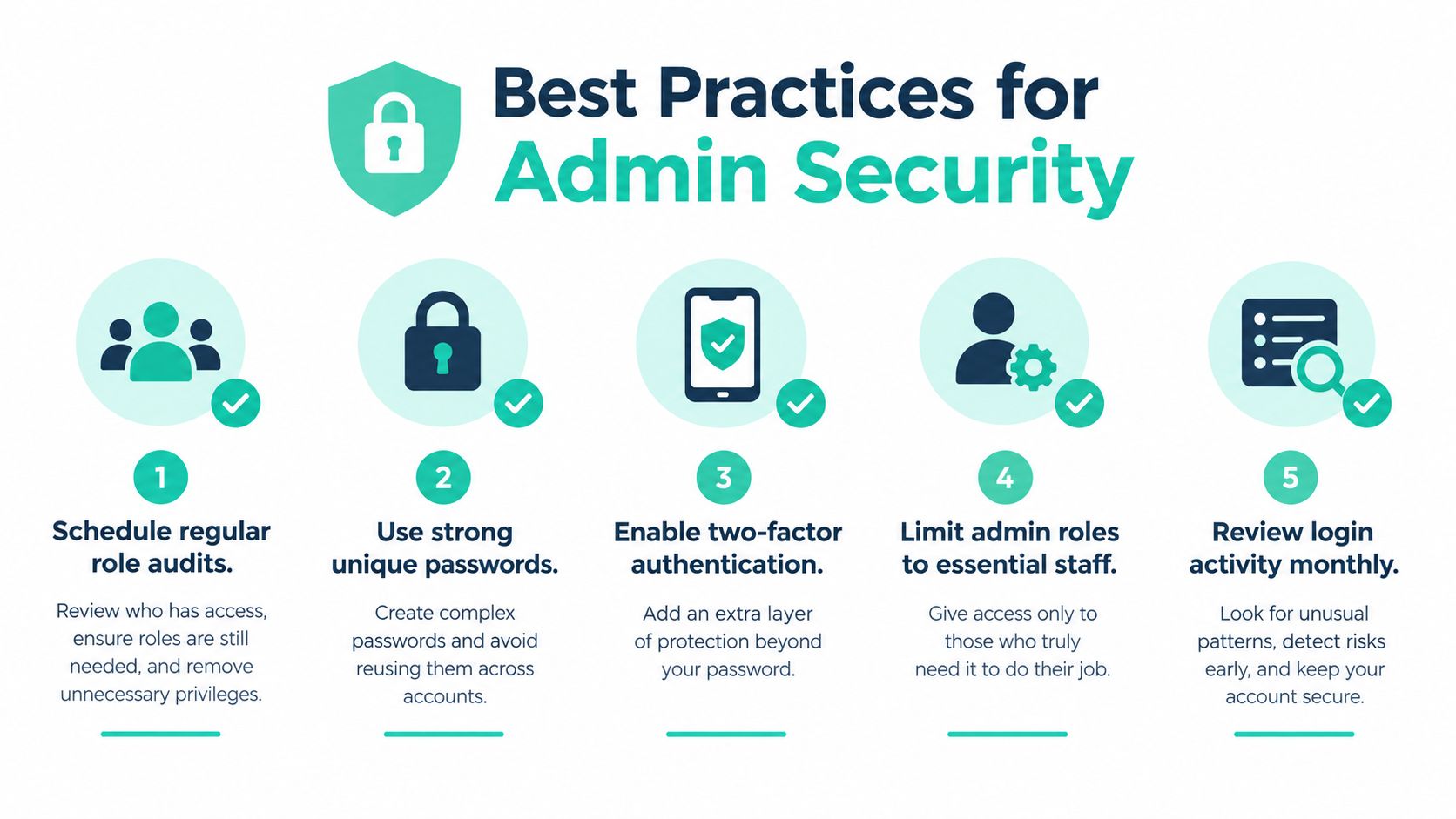
The habits that keep the Page usable and safe
- Audit roles on a schedule: Review who has access whenever staffing changes, agencies change, or responsibilities shift.
- Separate publishing from intake: The person writing educational posts about probate or incapacity planning doesn't always need access to private conversations.
- Use an access log: Record who was added, why, who approved it, and when it should be reviewed again.
- Require stronger account security: Admin-level users should use strong unique passwords and account verification measures.
- Tie Page access to follow-up systems: If a campaign drives leads through Facebook, connect notifications and ownership to the same intake discipline you use for forms and calls.
For law firms expanding social activity without turning it into chaos, resources on how to grow your brand on social media can be helpful when paired with legal-specific controls. If you want a more connected operating model, an estate planning marketing campaign blueprint is a practical next step. One option firms use for that broader setup is SimpleLab Digital, which handles paid media, landing pages, and follow-up workflows in a way that can align social lead handling with the rest of the intake path.
Conclusion
Facebook Page administration looks minor until a real prospect falls through the cracks or a staff member gets access they never should've had. For estate-planning firms, that risk is sharper because marketing often crosses into highly personal conversations about family, incapacity, and asset planning.
The firms that handle this well do a few things consistently. They verify ownership, assign narrow roles on purpose, document access decisions, and connect social leads to a real human response process. That protects privacy and helps the marketing side work the way it's supposed to.
If your Page permissions are messy, fix them before you spend more on content or ads. Better administration won't replace strategy, but it does make strategy executable.
SimpleLab Digital helps law firms connect ads, landing pages, social media management, and follow-up into one workable system, which is exactly what estate-planning firms need when Facebook leads require fast response and tighter privacy control. If you want help building that process instead of patching it together internally, visit SimpleLab Digital.
Published via the Outrank tool