In 2024, 97% of U.S. consumers who researched an attorney online used Google, according to FindLaw's U.S. Consumer Legal Needs Survey, as reported in this local SEO overview. A Google Business Profile for law firms is therefore more than a directory entry. It's a place where prospective clients decide whether your firm looks relevant, credible, and easy to contact.
Start by checking which listing your firm is eligible to claim, not by creating profiles for every attorney and city you serve. The useful approach pairs accurate firm and practitioner listings with a review process that doesn't pressure clients, steer their comments, or expose confidential information.
Table of Contents
- Which Google Business Profile Your Firm Can Create
- Setup Checklist for a Complete Law Firm Profile
- How to Ask for Reviews Without Breaking Ethics Rules
- Review Request Timing and Follow-Up Sequences
- Review Links and Landing Pages That Get Clicks
- Handling Negative Reviews and Profile Problems
- Put Your Google Business Profile to Work
Which Google Business Profile Your Firm Can Create
Law firms can qualify for a Business Profile, and lawyers can qualify as individual practitioners. The right structure depends on whether you're representing the firm, a public-facing attorney, or a separate office.
Google's business representation guidelines govern firm names and practitioner listings, and warn that unnecessary information in a business name can result in suspension. Its eligibility guidance requires a real business that makes in-person contact with customers during its stated hours.
Which Google Business Profile fits your situation
| Your situation | Profile to create | Google requires | Watch out for |
|---|---|---|---|
| Solo attorney with a staffed office | One profile representing the solo practice in its real-world name | Real office, staffed during stated hours, with in-person client contact | Never append keywords such as Best Divorce Lawyer to the name |
| Firm with several attorneys | One firm profile, plus optional practitioner profiles | Each named attorney genuinely practices there and independently meets practitioner eligibility | Don't create duplicate firm listings or competing copies for the same attorney |
| Individual attorney at a larger firm | Practitioner profile associated with the firm's actual office | Attorney is a real, public-facing practitioner who can be contacted at that location | Keep the attorney's name, professional identity, and firm relationship accurate |
| Multi-location firm | One profile per eligible staffed office | Each office is real, staffed, and meets clients there | No city-name listings for offices you don't have |
| Fully virtual or mailbox-only practice | Usually not eligible on that basis | Qualifying in-person client contact, not simply a mailing address | A virtual office or PO box alone doesn't qualify |
Where firms get the structure wrong
A separate practitioner profile isn't automatically justified because an attorney appears on the website. Evaluate whether that lawyer serves the public from the listed location and meets Google's practitioner requirements. For a solo practice, avoid creating a firm listing and an attorney listing that merely duplicate the same business.
Use the real-world business name, not an expanded search phrase. City names, slogans, additional attorney names, and claims such as best personal injury lawyer don't belong in the name unless they form part of the business's established name.
Practical rule: A profile should describe an existing practice or office. It shouldn't manufacture a local presence.
For multi-location firms, an office page should explain that office's attorneys, contact details, access, and services. Swapping city names into otherwise identical pages isn't a substitute for real offices or useful local content.
Build these decisions into your law firm SEO strategy, with an attorney checking the firm's applicable state or provincial advertising rules. Find your situation in the table, confirm the caveats, and claim only the profiles your real operation supports.
Setup Checklist for a Complete Law Firm Profile
Accuracy comes before activity. Posting updates won't fix an incorrect category, an unanswered phone number, or a website destination that describes a different office.
Google identifies relevance, distance, and prominence as its local ranking dimensions in its local ranking guidance. You can improve how clearly the profile represents your work, but you can't optimize away the distance between an office and a searcher.
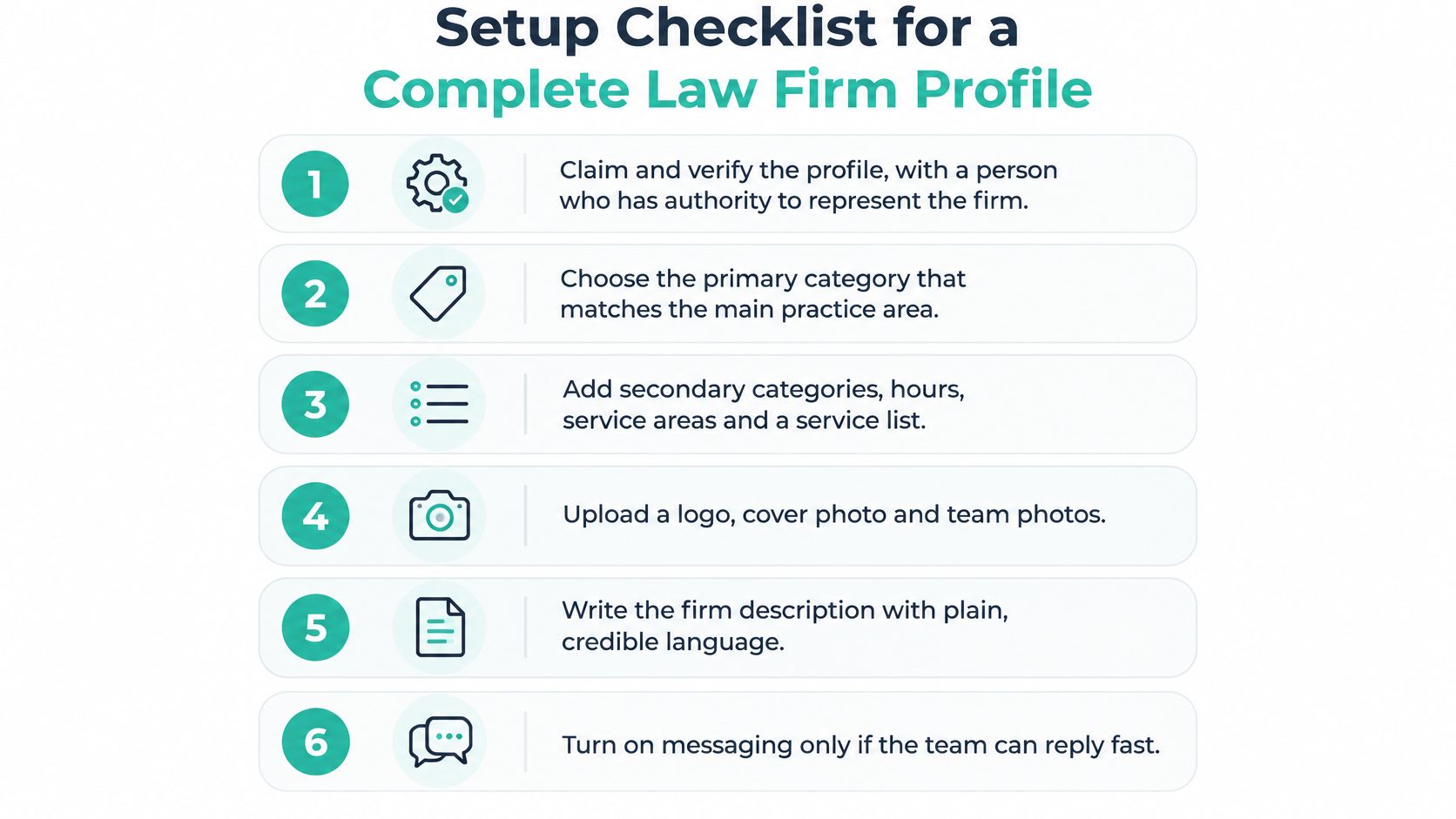
Use this visual as a setup aid, then verify each field against the actual practice.
Complete the essential fields
Claim and verify with authorized access. Search for the existing listing before creating another. Use a firm-controlled account, document ownership, and give outside vendors manager access rather than making them the firm's only route into the profile.
Choose the primary category deliberately. Select the available category that best describes the core practice, such as Estate planning attorney, Family law attorney, or Personal injury attorney. Don't choose an unrelated category because the associated cases appear profitable.
Add genuine secondary categories and services. An estate planning practice might list wills, trusts, and powers of attorney. Use recognizable service names rather than strings of city names and near-me keywords.
Check contact details against reality. Confirm the local phone number, website, suite number, map pin, business hours, and appropriate address or service-area settings. An answering service doesn't make an otherwise closed office staffed around the clock.
Upload useful photographs. Include the exterior entrance, reception, attorneys, and team, without visible client documents or identifiable clients. Google reports 42% more direction requests and 35% more website clicks for businesses with photos than those without in its Business Profile guidance, an aggregate comparison rather than a promised law firm result.
Write a factual description. Explain the practice areas, jurisdictions served, languages offered where applicable, and consultation process. Avoid outcome guarantees or unsupported superiority claims.
Choose a matching website destination. A location profile should generally lead to its office page. A focused practice should make the relevant practice-area content easy to reach, rather than sending every visitor into a generic navigation menu.
Establish the intake baseline
Record profile calls, website clicks, and direction requests alongside qualified inquiries, booked consultations, and retained matters. Ask intake to distinguish a relevant prospective client from a vendor call, wrong number, or matter outside the firm's jurisdiction.
Google explicitly says businesses can't request or pay for better local rankings in its ranking guidance. Evaluate the work by meaningful inquiries, not a vendor's guaranteed position. Use a law firm SEO audit checklist to check whether the website supports what the listing promises.
Treat any messaging option shown in setup materials as conditional on current availability and staffing. Don't advertise a communication channel nobody monitors.
How to Ask for Reviews Without Breaking Ethics Rules
Ask for honest feedback, not a favorable public statement. Google's fake-engagement policy permits genuine review requests but prohibits incentives, manipulation, and requests for specific review content; violating activity can lead to profile restrictions.
Professional-conduct review is a separate step. U.S. firms should have supervising counsel assess requests under ABA Model Rules 7.1 through 7.3, concerning communications, advertising, and solicitation, together with the controlling state rules. Canadian firms should use their provincial regulator's rules rather than treating the ABA framework as applicable Canadian law.
This distinction helps intake staff recognize the boundary before sending a request.

Give intake clear boundaries
- Ask eligible clients neutrally. Apply the same approved eligibility criteria regardless of satisfaction. This addresses Google's manipulation and selective-solicitation concerns; have counsel separately assess professional solicitation restrictions.
- Don't prescribe content. Never ask clients to mention an attorney, practice area, settlement, verdict, or case detail. This follows Google's content-request restriction and helps protect against confidentiality and misleading-advertising problems.
- Offer private contact without screening. Make a private feedback route available to everyone alongside the public option. Don't require a satisfaction survey before revealing the Google review invitation.
Eligibility should concern legitimate operational exclusions, such as a request not to be contacted, not whether staff expect praise. An unhappy client must not lose access to the same public review option.
Copy-ready wording
In person, when the matter concludes
Thank you for trusting us with this. If you have a moment, would you share your honest experience with our firm on Google? It helps others find us. Please avoid including private or case-specific information.
Thank you for choosing [Firm]. We appreciate the opportunity to assist you.
If you'd like, you can share your honest experience on Google. Please avoid including confidential or case-specific information.
Button label: Leave a Google review
SMS, through an approved messaging process
Thank you for choosing [Firm]. If you have a minute, we'd appreciate your honest feedback on Google: [review link]. Please avoid private case details.
Before adopting an automated workflow, use this video as a discussion aid for the team and have counsel approve the actual scripts.
Don't offer gift cards, discounts, donations, or priority service in exchange for reviews. Don't specify a star rating, write a review for the client, or pressure someone whose matter is ongoing.
For immigration practices, take particular care with public references to status, applications, and family circumstances. The broader SEO checklist for immigration lawyers can support discovery planning, but review requests should remain neutral and privacy-conscious, not keyword campaigns.
Review Request Timing and Follow-Up Sequences
A review request should arrive when a client can consider it without feeling that cooperation affects legal service. Choose a predictable service milestone, not a satisfaction score. A favorable outcome can be an appropriate moment, but it must not become the criterion that excludes dissatisfied clients.
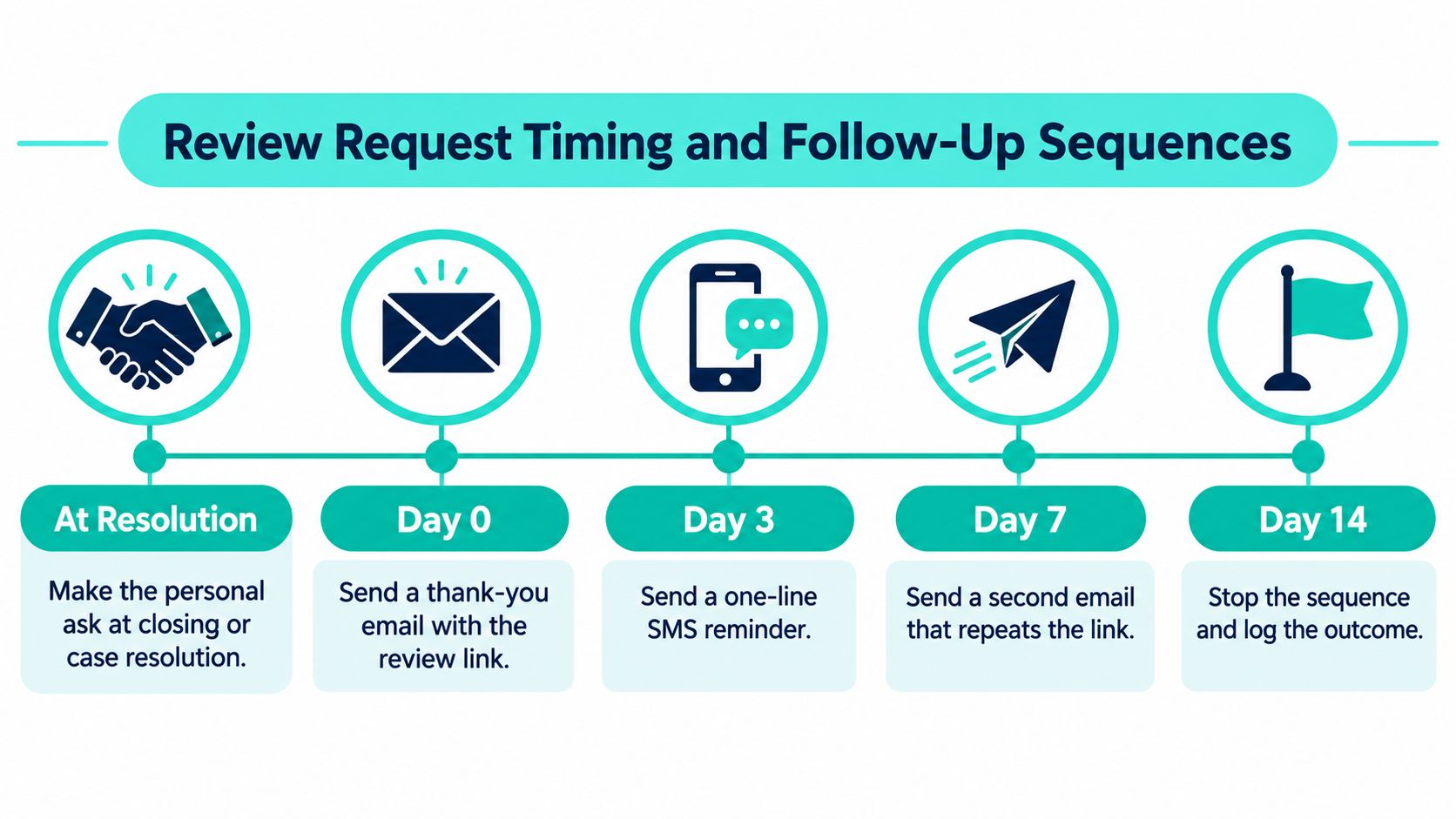
The following is a suggested operational cadence, not a legal deadline or a Google requirement. Skip reminders when the client declines, opts out, or has already responded.
Review request follow-up sequence
| When | Channel | Goal | Message focus |
|---|---|---|---|
| At resolution or closing | In person or phone | Make the personal ask | Thank them first, then invite honest feedback |
| Day 0 | Deliver the link while the interaction is recent | Two-sentence thank-you plus the review link | |
| Day 3 | SMS, only with approved consent | Remind without pressure | One-line message with the same link |
| Day 7 | Final nudge, then stop | Last friendly ask; no further messages after this |
The visual adds an administrative closeout milestone. That's a task for staff, not another message to the client.
Match the milestone to the practice
An estate planning firm can make the invitation at the document-signing appointment, once substantive questions are resolved. A real estate firm can include it in closing-day communications without making it part of the signing requirements.
For family law, use a calm post-hearing check-in rather than a courthouse hallway or an emotionally charged exchange. For personal injury, settlement disbursement may be a suitable administrative milestone, provided the request doesn't imply that compensation creates an obligation to praise the firm.
These are workflow recommendations, not universal timing rules. Counsel and the matter team should approve exceptions for vulnerable clients, ongoing disputes, or sensitive communications.
A review reminder should be easy to ignore. It should never resemble a required step in finishing the legal matter.
Make consent a launch condition
Adopt documented written permission before review-request texts as the firm's internal standard. Have counsel check the actual message, technology, consent language, and recipient circumstances against the FCC's TCPA requirements in the U.S. and the CRTC's CASL guidance in Canada. Written permission alone shouldn't be treated as proof that every applicable requirement has been satisfied.
Log the permission, approved channel, send history, and opt-out status in the CRM. Process opt-outs immediately, and don't switch channels to get around a refusal.
Use the same destination throughout the sequence and keep each message short. If reliable completion tracking isn't available, avoid surveillance-style language suggesting that staff know whether a client has posted.
Review Links and Landing Pages That Get Clicks
The review invitation should take clients directly to the correct firm or office. Don't make them search your business name, distinguish overlapping attorney listings, and guess where their feedback belongs.
Retrieve the direct review link from the profile's Ask for reviews sharing option when available. Confirm the destination before shortening it or placing it in a template.
Test the experience on a phone, where clients may open the request between other tasks.

Review landing page five-block wireframe
A landing page is optional. Use one when clients need a little context or when your team needs a consistent destination across email, SMS, and printed closing materials.
| Block | What it contains | Example |
|---|---|---|
| 1. Headline | Thank the client in one line | Thank you for trusting [Firm] |
| 2. Primary button | Labeled Leave a Google review | Links to the firm's direct review URL |
| 3. Instructions | Brief, neutral steps | Choose a star rating, add a sentence or two if you wish, submit |
| 4. Private feedback link | Secondary option for concerns, shown beside the public ask | Opens a private feedback form, not a public post |
| 5. Footer | Firm name and contact details only | No competing promotional links |
Don't suggest what the client should say. The instructions explain the interface, not the desired opinion.
Keep the private route visible without asking visitors to classify themselves as happy or unhappy first. Both choices should be available on arrival, with no star-rating screen that redirects dissatisfied visitors away from Google.
Test the whole path
- Check the listing identity. Open the destination while signed out and confirm that it names the intended firm or office.
- Check mobile usability. Make the button easy to tap and remove pop-ups, newsletter offers, and navigation distractions.
- Check any shortened link. Use a firm-controlled redirect or approved shortener, and verify that it still reaches the correct review destination.
- Check privacy. Don't put client names, matter numbers, or legal issues in tracking parameters.
Place the invitation in closing packets, approved email signatures, and appointment follow-ups where appropriate. An intake confirmation can make a general feedback route available, but it's premature to ask a new prospect to review legal work they haven't received.
Review pages serve a different purpose from law firm consultation landing pages. Don't combine them into a page that asks existing clients for reviews while pitching prospective clients a consultation.
Handling Negative Reviews and Profile Problems
Use a restrained response that doesn't identify the reviewer or discuss the matter:
Thank you for sharing your feedback. We take concerns seriously. To protect privacy, we don't discuss individual circumstances publicly. Please contact our office directly so the appropriate team member can assist.
Have the supervising attorney approve the response when a review alleges misconduct, reveals sensitive information, or threatens a claim. An intake employee shouldn't improvise a factual defense in public.
Negative reviews and profile problems triage
Treat these as possible explanations to investigate, not automatic diagnoses.
| Problem | Likely cause | What to do |
|---|---|---|
| Negative review mentions case details | Reviewer disclosed potentially confidential information | Reply generically without confirming representation; flag the content where Google policy provides a removal basis |
| Angry review after a fee or outcome dispute | Possible disagreement about expectations, fees, or the result | Offer an offline discussion; don't debate facts or make legal admissions in the reply |
| Profile suspended | Possible name, duplicate-listing, or office-eligibility violation | Identify and correct the actual issue, then use the available appeal or reinstatement process |
| New reviews not appearing | Possible filtering or suspicious-activity detection | Audit the request process, pause questionable automation, and request only genuine feedback |
| False or competitor-created listing | Unauthorized or inaccurate profile creation | Claim it if it represents your legitimate business; otherwise report it |
A reviewer's disclosure doesn't mean the firm should repeat or verify it. Even confirming that someone was a client can create a separate professional-conduct concern.
Nor does a mention of case details automatically qualify a review for removal. Report the specific platform violation, if one exists, rather than assuming that an unfavorable account is prohibited.
Repair the cause, not the appearance
If a profile is suspended, save the notice and review recent edits before making changes. Assemble evidence of the actual office and business identity, correct the mismatch, and submit a coherent appeal. Don't create a replacement listing to evade the suspension.
For missing reviews, check whether staff offered incentives, used satisfaction screening, or supplied suggested review text. Varying the wording of neutral requests can make communications less repetitive, but it won't cure an underlying policy violation and shouldn't be used to evade detection.
Don't replace missing reviews with staff, friends, or purchased reviewers. Ask clients to describe genuine experiences without coordinating their accounts or devices.
Assign a named internal owner to check profile changes, access permissions, office details, and incoming review alerts. Review the listing monthly and after any move, rebrand, attorney departure, or phone-system change.
The owner should also maintain an escalation path: intake handles routine routing, marketing documents platform issues, and an attorney approves sensitive public responses. That division keeps a reputation problem from becoming an avoidable confidentiality problem.
Put Your Google Business Profile to Work
This week, verify the eligible profile and send an approved thank-you email to a recently closed matter, provided the client is eligible under your firm's contact policy. Use the direct review destination, record the send, and make someone responsible for any reply.
A firm with available intake capacity can run this process in-house. What matters is reliable ownership: someone maintains office information, someone approves communications, and someone connects inquiries to consultations and retained matters.
Make calling as straightforward as reviewing
Check the public phone experience from a mobile device. If the calling option is missing or unclear, Heyline's guide explains how to enable the Google call button. Then test the actual call routing, because a visible button doesn't help when prospective clients reach the wrong office or an unmonitored voicemail.
For firms that need implementation support, our law firm marketing hub brings together profile upkeep, practice-area content, landing pages, and follow-up planning. SimpleLab Digital works across estate planning, family law, real estate, civil litigation, immigration, personal injury, criminal defense, employment, business law, and bankruptcy.
Keep the broader acquisition plan connected to intake capacity. Our digital marketing for lawyers growth guide provides context for coordinating search visibility with ads, content, and follow-up, rather than treating the profile as an isolated task.
SimpleLab Digital offers local SEO and website upkeep, focused landing pages, and email and SMS workflows that connect profile discovery with qualified inquiries. Visit SimpleLab Digital to discuss your firm's listing structure, review-request process, and the implementation support your team needs.