Your campaign is spending, clicks are coming in, and the phone isn't ringing with the right kind of work. A law firm sees inquiries about jobs and free advice. A home services company pays for do it yourself research. An e-commerce store attracts shoppers looking for products it doesn't sell. The keyword list looks sensible on paper, but the actual searches tell a different story, and that's where optimization has to start.
Table of Contents
- Exclude when there's no credible path to value
- Refine when the intent is right but control is loose
- Preserve when the intent needs a different path
Why Search Term Optimization Matters
A plumber targeting emergency repairs can watch spend climb while queries drift toward tutorials, parts, and apprentice jobs. The clicks aren't fake. They're just misaligned with the offer, the service area, and the customer's readiness to hire. Without reviewing what people typed, you'd keep judging performance by the keywords you intended to buy.

The Google Ads Search Terms Report closes that gap. Google describes it as a list of search terms used by a significant number of people that resulted in an ad being shown, with data such as impressions, clicks, cost, and conversions, as explained in Google's definition of the Search terms report. Your keyword list expresses intended coverage. The report shows how matching behaved in real auctions.
What gets hidden when you skip the review
Wasted spend is the obvious cost, but it's rarely the only one. Budget shifts toward broad, cheap looking queries, landing pages receive visitors they were never built for, and intake teams spend time qualifying people who were never prospects. For a small business working through the basics in a practical guide to pay per click for small businesses, that noise can make a sound channel look broken.
- Wrong service intent: A divorce attorney matching to searches about annulment forms or mediation training isn't reaching the same buyer.
- Wrong readiness: Research queries can produce clicks and even form fills, but they seldom turn into booked consultations at the same rate as service specific searches.
- Wrong geography: A query naming a city you don't serve is a budget leak, even when the service wording looks perfect.
Practical rule: Judge a query by the business outcome it produces, not by how closely its words resemble your keyword.
This work isn't a one time cleanup. Searches shift, match behavior expands into new phrasing, and offers change. The ongoing job is deciding which queries to exclude, which useful variants to retain, when to tighten match types, and when a legitimate intent just needs a different destination and follow up path.
Find and Prepare the Search Terms Report
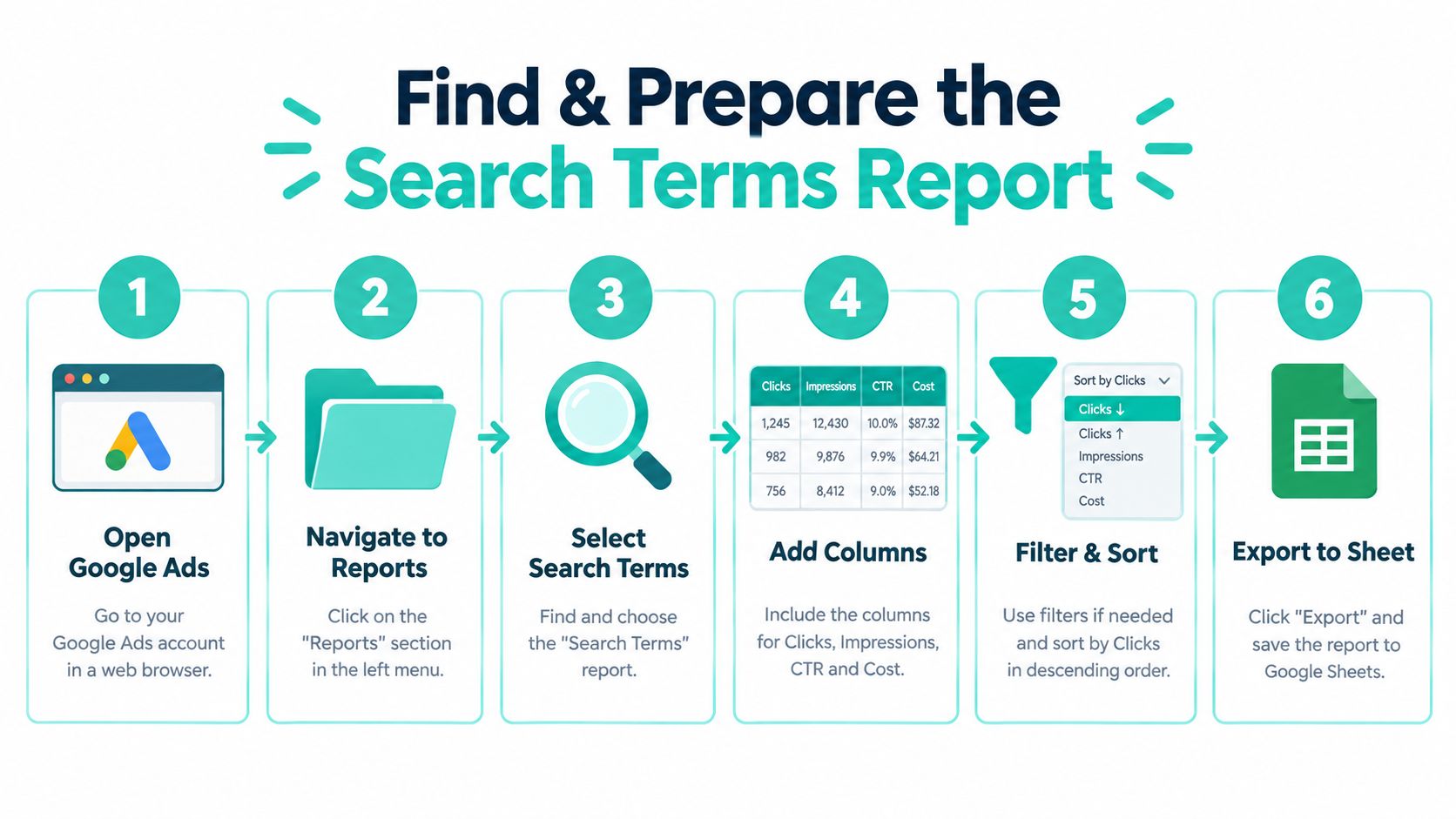
Open Google Ads and go to the reporting area for your Search campaigns, then select the search terms view at the campaign or ad group level you want to examine. Start narrow. Reviewing one practice area, one home service, or one product category at a time gives you context that an account wide export buries. A branded campaign and a nonbrand campaign should never be judged in the same pass, because their intent and economics differ.
Set up columns before you judge anything
Add the columns that support a business decision, not just a traffic decision. You want the search term itself, the keyword or targeting context that triggered it, impressions, clicks, cost, and conversions. Then bring in what Google Ads can't tell you on its own, including qualified inquiries, booked appointments, and revenue from your CRM or intake log.
- Pick a meaningful date range: Use a window long enough to avoid reacting to one odd day, and keep it consistent between reviews.
- Sort by cost first: Expensive queries deserve scrutiny before low spend curiosities, however strange those curiosities look.
- Filter by campaign and ad group: The same query can be a good fit in one ad group and a poor fit in another.
- Export with notes space: Add columns for intent category, service fit, geography fit, and your eventual decision.
Prepare segments that match how you sell
Segment by spend, conversions, and service intent before making edits. A family law firm might separate custody, divorce, and support queries. A roofer might separate repair, replacement, and inspection intent. Geography matters just as much, since a town name inside the query often signals readiness to hire locally.
Marketplace sellers face a parallel discipline with listing terms, which is why resources like this Amazon backend keywords guide can be a useful reminder that the words you target behind the scenes and the words buyers use are two different things. In Google Ads, your preparation should end with a short, prioritized list. If you've got hundreds of rows and no downstream lead quality attached to them, you're not ready to optimize yet. You're only ready to sort.
Interpret Query Intent and Business Value
Relevance is too blunt a test. A query can mention your exact service and still be worthless because the searcher wants a job, a free template, or a city you don't serve. Another query can look messy and still come from someone ready to buy. Your job is to classify intent in business terms, then verify that reading against outcomes.
Six checks that beat a relevance gut check
Run each meaningful term through service fit, urgency, location, commercial intent, ability to pay, and inquiry quality. A search like emergency plumber in a served suburb scores well on nearly all six. A search about how plumbers unclog drains mentions the trade but signals research, not hiring. Similar wording, very different decisions.
Attribution complicates the reading, since the click that gets credit isn't always the click that started the relationship. If that distinction affects how you value early research queries, see how Chartsy handles attribution before you write off every term that doesn't convert on the last touch. Pair that thinking with the economics in calculating break even ROAS the right way, so a query must justify itself against margin and case value, not just conversion count.
Search Term Decision Matrix
| Observed Query Pattern | Business Interpretation | Recommended Action | Why |
|---|---|---|---|
| Service plus served city, urgent wording | High intent, ready to hire | Retain and refine targeting | Fits offer, location, and timing |
| Service plus salary, jobs, or training | Career research, not buying | Exclude as negative keyword | No plausible path to revenue |
| Free, cheap, or legal aid wording | Budget constrained, may still need help | Separate campaign or eligibility page | Intent is real but economics differ |
| How to or do it yourself phrasing | Self help research | Exclude or send to informational content | Clicks rarely become qualified inquiries |
| Competitor or unrelated brand name | Comparison or mistaken match | Review outcomes, then separate or exclude | Value depends on downstream quality |
A high volume query that produces weak leads is not a winner. It's a cost center with good traffic numbers.
Sort by meaningful cost or outcome, group terms into intent categories, and record why each pattern merits exclusion, refinement, or different treatment. That audit habit protects you from overreacting to a single strange query. It also respects a reporting limit covered later in this guide, which is that privacy filtering means you won't see every low volume search individually.
Choose the Right Optimization Action
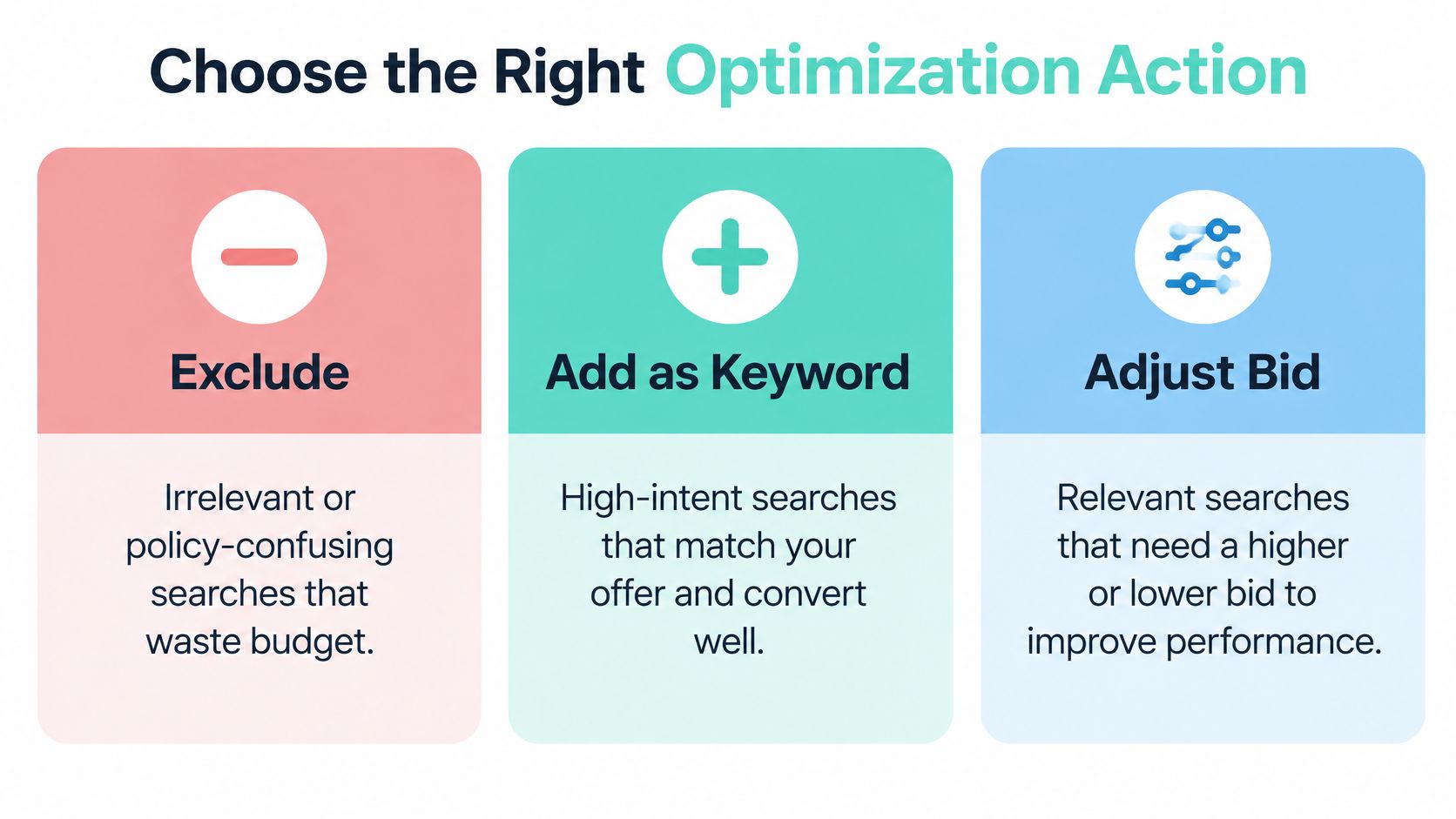
Most advertisers learn one move, which is adding a negative keyword, and then apply it to everything that looks off. That habit creates its own waste. Some queries should be excluded without debate. Others are useful demand wearing unfamiliar wording, and cutting them removes revenue you'd have happily paid for if the phrasing had matched your expectations.
Exclude when there's no credible path to value
Job seekers, students, salary research, and searches for services you don't offer belong here. So do queries that create policy or expectation confusion, such as a private law firm matching to searches for a public defender. Google's own guidance supports using the report to exclude poor fit searches while also discovering successful phrases, a dual purpose described in Google's guidance on negative keywords and search terms.
Be precise with the exclusion. Blocking a single word like free across an account can kill legitimate searches such as free consultation, which many firms actively offer. Exclude at the level the evidence supports, whether that's one ad group, one campaign, or a shared negative list.
Refine when the intent is right but control is loose
A close variant that converts into qualified inquiries deserves tighter handling, not removal. Add it as a keyword in the right ad group, adjust its bid treatment, or sharpen the ad and landing page so the match between query and destination improves. That alignment work connects directly to the relevance factors discussed in this practical guide to Google Ads Quality Score and CPC.
Preserve when the intent needs a different path
This is the option advertisers miss most often. Searches like free legal advice, legal aid, or how to file myself look negative at first glance. Yet some of those searchers are urgent, budget constrained prospects who need an eligibility page, a lower friction offer, or a nurture sequence rather than a blanket exclusion. Semantic similarity doesn't equal commercial equivalence, and the reverse is also true.
- Local services: A cheap roof repair query may belong in a separate campaign with a repair specific page, not in your replacement campaign.
- Professional practices: Cost related legal searches can justify a fees explained page with a consultation offer, measured separately.
- E-commerce: A query naming a use case you serve but don't advertise may warrant its own landing page before you decide it's irrelevant.
Preserving a query doesn't mean leaving it unchanged. It means deliberately changing the campaign, destination, follow up, and measurement so that differently motivated demand gets judged on its own economics. If you can't build that separate path, exclusion may still be the honest answer. Keeping a query you can't serve well is not a strategy.
Refine Match Types and Campaign Structure
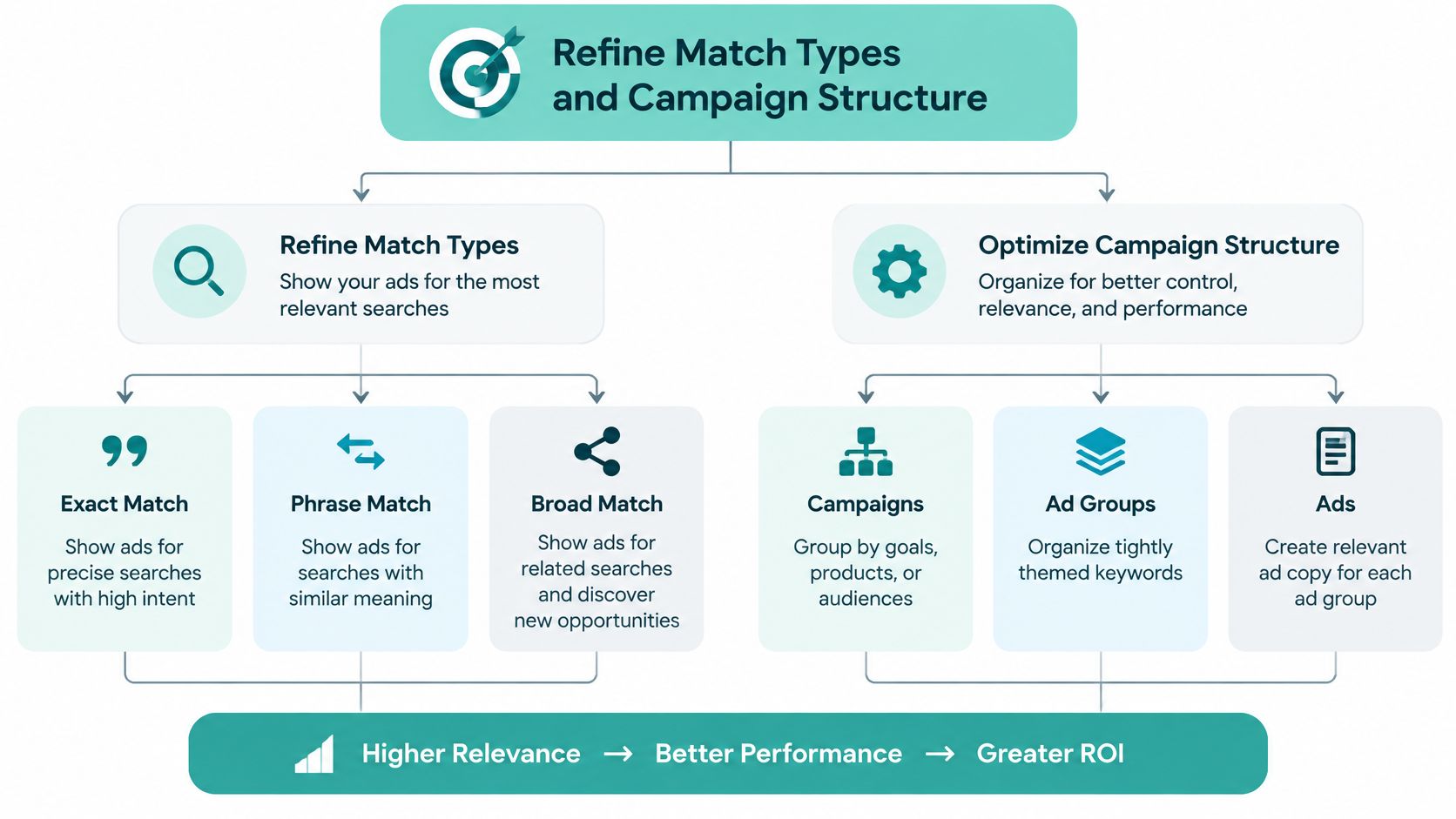
Reported search terms can differ from your selected keywords because of keyword matching options, and that single fact should shape how you restructure. You're not managing a fixed list of phrases. You're managing how much interpretive room Google gets around each phrase, and then checking the report to see what that room produced.
The visual below maps how those structural choices connect, from campaign intent down to the landing page a query deserves.
Let proven queries earn tighter control
When an exact query pattern repeatedly produces qualified inquiries, adding it as a more controlled keyword gives you cleaner data and more predictable ad matching. When a related phrase reveals adjacent intent you hadn't targeted, phrase level coverage can capture variations without opening the door fully. Broader targeting still has a place for discovery, but it needs guardrails in the form of negative lists, tight location settings, and frequent report reviews.
Don't rebuild the account around every row in the report. One off phrasing doesn't justify a new keyword, and copying every variation creates clutter you'll never maintain. Act on patterns that repeat with meaningful spend or outcomes.
Separate ad groups by intent you can serve distinctly
Group queries by service, location, or intent category only when that separation changes the ad copy or landing page. Custody and divorce queries for a family law firm deserve different messages and destinations. Repair and replacement queries for a roofer do too. If two groups would share the same ad and page, splitting them adds maintenance without adding relevance.
The walkthrough below shows how these targeting decisions look inside a working account, which helps when you're translating report rows into structural edits.
Structural discipline compounds over time. Cleaner ad groups make the next report review faster, because each query arrives with obvious context. That discipline sits comfortably alongside the fundamentals in these best practices for Google Search Ads campaigns, and it keeps you from recommending a broad restructure when the evidence only supports a small, contained fix.
Build a Repeatable Optimization Workflow
A solo advertiser or small team doesn't need a complicated ritual. You need a fixed review cadence, a consistent order of operations, and a written record of why each change was made. Weekly reviews suit active campaigns with meaningful spend, while quieter accounts can work on a longer cycle. What matters is that the date is set before the budget forces the conversation.
Run every review in the same order
- Start with highest cost patterns: Review expensive query groups first, since that's where misclassification costs real money.
- Check qualified outcomes: Compare each pattern against booked consultations, sales, or revenue, not a single day of clicks.
- Document the decision: Note whether you excluded, refined, or preserved the query, and the reasoning behind it.
- Apply contained changes: Edit only what the data supports, so you can tell later which change moved results.
- Verify after enough data accumulates: Judge the effect on inquiry quality, then keep, adjust, or reverse the change.
Separating patterns from noise is the skill that makes this sustainable. A single bizarre query with one impression is trivia. The same intent appearing across many phrasings, week after week, is a structural signal. Document negative keywords in shared lists with clear names, and check landing page alignment whenever a preserved query starts underperforming, since the destination may be the problem rather than the demand.
Account for privacy filtering in your history
Google materially changed report availability through privacy updates in 2020 and 2021. Google said searches for online privacy increased by more than 50% between spring 2019 and spring 2020, and it then applied thresholds so only queries with sufficient search volume are shown, as detailed in Google's notice on updated privacy thresholds for search terms. Newly eligible data applied to searches from February 1, 2021, and older data that failed the newer thresholds remained available only until February 1, 2022.
In September 2021, Google also began showing historical queries that generated impressions but no clicks, still limited to terms searched by a significant number of users. The practical consequence is that pre 2020 and post 2020 reports aren't perfectly comparable. A drop in visible query diversity may reflect filtering, not a change in customer behavior, so lean on aggregated performance and qualified outcomes.
Operator note: Treat the report as a strong sample of demand, never as a complete census of every search that triggered your ads.
When the report looks sparse, check your date range, campaign volume, and whether privacy thresholds are suppressing low volume terms before assuming targeting is clean. When changes show no immediate effect, confirm the negative was added at the right level and give the account enough auctions to respond. When terms stay broader than expected, revisit match type settings and campaign structure, using the same fundamentals you'd apply when following steps to create a successful Search Ads campaign on Google. Troubleshooting works best when you change one variable, record it, and resist stacking fixes you can't untangle later.
Apply the Query Decisions with Confidence
You don't need a perfect taxonomy to improve an account this week. You need a decision sequence you can repeat under time pressure, with a clear record of what you changed and why. Small businesses rarely fail at this because the report is confusing. They fail because reviews happen only after spend already hurts.
Your next review in six moves
- Confirm context: Check campaign, ad group, date range, and the keyword that triggered each term.
- Find patterns: Group queries by intent instead of reacting to isolated phrasing.
- Weigh downstream quality: Use qualified inquiries and revenue, not clicks alone.
- Choose the action: Exclude, refine, or preserve with a separate path.
- Fix the destination: Match ad copy and landing page to the intent you're keeping.
- Measure and schedule: Record the change and set the next review date before you close the account.
Two cautions keep this process honest. Don't copy every apparent variation into your keyword list, because clutter makes future reviews slower and rarely improves control. Don't optimize toward cheap clicks either, since the cheapest query in the report is often cheap precisely because serious buyers aren't behind it.
The durable principle is simple. Every search term decision should support qualified demand and a coherent journey from query to ad to page to follow up. When a term can't support that journey, exclude it. When it can support a different journey, build that path and measure it separately. When it already supports the journey you want, tighten control and let it work.
If your search terms are sending budget toward the wrong inquiries, SimpleLab Digital can rebuild that path with managed Google Ads, matching landing pages, and follow up measured against qualified inquiries and revenue. Our subscription packages give small businesses and law firms a single point of contact and steady optimization without a long term contract. Visit SimpleLab Digital to see how a cleaner query strategy fits into a complete monthly marketing plan.