Most advice on how to get traffic to your site tells you to do everything at once. Post daily, blog weekly, run ads, chase backlinks, be on every platform. That's how small businesses burn months and still can't tell you what produced a single qualified inquiry.
Don't start there. Pick two channels, fix the page those visitors will land on, and rank every option by time to first visit and cost per qualified inquiry. A channel that sends cheap visits to a slow, confusing page isn't cheap. It's wasted spend. Slow channels aren't bad either, but you need to know you're waiting months before you judge them.
Table of Contents
Traffic Channels Compared by Speed and Cost
Start with a hard limit on search alone. The 2024 clickstream study reported by Search Engine Land found 58.5% of U.S. Google searches and 59.7% of EU searches ended without a click to any result. Of every 1,000 searches, only about 360 clicks in the U.S. reached the open web. If you rely on blue links only, most demand never reaches you.
Traffic channels compared by time to first visits and cost
| Channel | Time to First Visits | Cost Pattern | Best Fit |
|---|---|---|---|
| Organic search (SEO) | 4-12 months for competitive terms | Staff time or agency retainer | Services with steady search demand and buyer intent |
| Google Ads search | Days after launch | Pay per click, average CPC $5.42 | Capturing demand that already exists |
| Paid social (Meta, TikTok) | Days after launch | Pay per click or per thousand impressions | Visual offers and retargeting |
| Google Business Profile | Days to weeks after verification | Free to set up | Local service businesses and clinics |
| Organic social and short video | 1-3 months to build an audience | Time or production budget | Educational and visual brands |
| Email and SMS to existing contacts | Immediate once a list exists | Tool cost and writing time | Businesses with past leads or customers |
| Referrals and partner links | 1-6 months to build relationships | Mostly time | Niches with complementary businesses |
Timelines depend on your service, starting point, budget, and competition. Paid campaigns can begin collecting data after launch, but content and organic search usually need a longer period to develop. Use that difference, don't fight it.
Three rules for choosing your first two
- Budget but few pages: Start with Google Ads search while SEO builds, and compare platforms in this guide to online advertising platforms worth knowing in 2026 before you split spend.
- Local service business: Verify your Google Business Profile first. It's free and it puts you in map results where buyers already look.
- Existing list: Start with email and SMS. Past leads and customers are the warmest visits you can get, and they cost the least to reactivate.
Pick one channel that builds over time and one fast channel that proves demand. Write down why you chose each one.
You should leave this decision with a shortlist of two channels and one first action for each. Anything more is a distraction until those two produce data.
How to Earn Search Traffic That Compounds
Search pays back slowly, then keeps paying. A ranking page can bring visits month after month without a new click charge, which is why it's worth building even while faster channels run.
The three steps below show why position, not just indexing, drives that payoff.
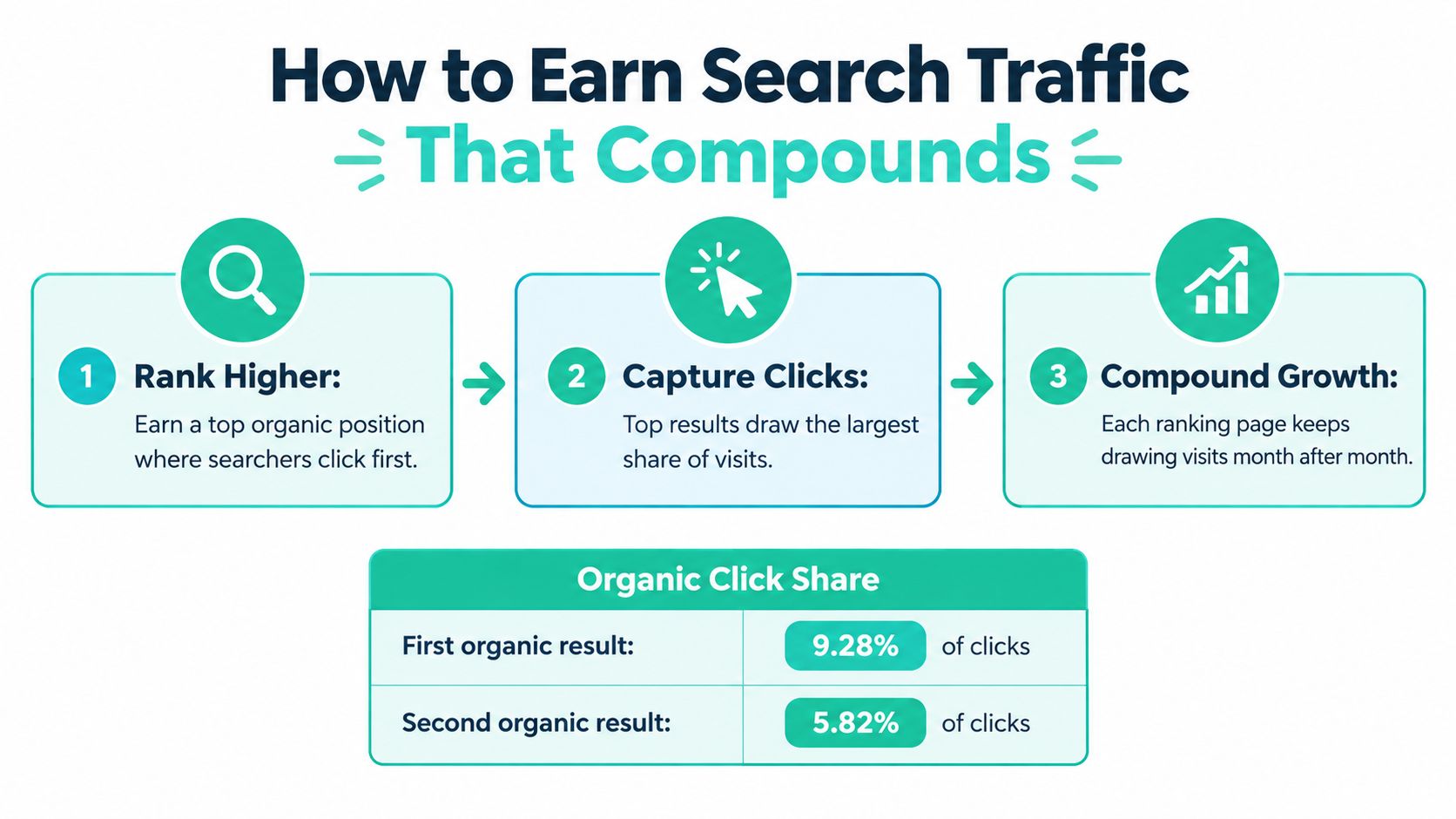
The 2024 academic study of Google organic click-through rates analyzed 31,648,226 impressions and 416,386 clicks and estimated 9.28% CTR for position one, 5.82% for position two, and 3.11% for position three. Position one earns roughly three times the clicks of position three.
Estimated organic click-through rate by position
| Search Position | Estimated CTR | Clicks Compared With Position 3 |
|---|---|---|
| Position 1 | 9.28% | About 3.0x |
| Position 2 | 5.82% | About 1.9x |
| Position 3 | 3.11% | Baseline |
Getting indexed is the floor. Moving into the top three is what changes visit volume.
Build pages Google can find and rank
- One query, one page: Choose one target query per service or location and build one authoritative page for it. Don't create near-duplicate city pages that compete with each other.
- Sitemap first: Build an XML sitemap listing only canonical, commercially important URLs and submit it in Google Search Console.
- Control crawling: Use robots.txt to limit duplicate, parameter-generated, and low-value URLs. Crawling doesn't guarantee indexing, so don't confuse the two.
- Link internally: Link every important page from another findable page with crawlable HTML links. Kill orphan pages and redirect chains.
- Use buyer language: Put the words people type in your title and main heading, not internal jargon.
- Support local intent: Add structured data where eligible and keep your Google Business Profile current for local queries. A practical starting sequence is in this small business SEO and GEO starting plan.
- Check monthly: Review indexed pages and nonbranded impressions every month. Branded growth alone doesn't prove you're winning new demand.
This short walkthrough shows the same setup in practice, from page targeting to Search Console checks.
Expect several months before organic visits grow meaningfully, longer for competitive terms. Judge progress by qualified inquiries from search, not sessions alone. A page that ranks for the wrong intent can grow traffic and still produce nothing.
Fix the Landing Page Before Buying More Visits
Every dollar of paid traffic spends itself twice on a weak page: once on the click, once on the visitor who leaves without acting. Speed is the first culprit. The 2025 web design benchmark report analyzing 500 top-performing websites found top sites in early 2025 loaded in about 1.8 seconds on desktop and 2.4 seconds on mobile. Pages slower than that lose visitors before the offer even renders. The same report cites WebAIM's 2025 scan, which found detectable WCAG failures on 94.8% of the top one million home pages, so a page that loads but can't be used by every visitor still leaks inquiries.
Run these checks in order
- Test mobile speed: Fix the largest delay first, usually oversized images or heavy scripts.
- State the basics above the fold: Service, location, and next step, with no scrolling required. If a first-time visitor can't answer "what do they do and what do I do next" in five seconds, rewrite the top of the page.
- One primary action: Put one main button and a click-to-call link on every service page. Two competing buttons split the click and halve your data on which one works.
- Cut the form: Keep name, one contact method, and one qualifying question. This guide on how to simplify forms to increase conversions breaks down which fields to keep and which to drop.
- Make it readable: Short paragraphs, descriptive headings, and body text that needs no zooming on a phone.
- Check accessibility basics: Alt text, color contrast, labeled form fields, and keyboard navigation. Given how common detectable failures are, your competitors' pages almost certainly fail here too.
- Confirm follow-up: Every form submission should trigger an automated email or SMS immediately. A lead answered in minutes converts; a lead answered tomorrow is someone else's customer.
Diagnostic rule: If visits arrive but inquiries don't, check query relevance first, then the page, then the form.
Work through that order before increasing any budget. A focused landing page built around one offer is easier to test than a general service page trying to serve every visitor, and it gives you clean data on what changed. Fix the destination, then buy the traffic.
How to Run Paid Traffic Without Wasting Budget
Paid search is the fastest way to learn whether demand exists, but only if tracking and page match are set up before launch. Treat both as part of acquisition, not cleanup work afterward.
Set up in this sequence
- Group by intent: Put keywords for one search intent and one service in each ad group, so every group maps to a single problem.
- Mirror the search: Write ad copy that repeats the specific problem or offer the searcher typed.
- Match the page: Send each group to a matching service page with one primary conversion.
- Separate conversions: Track form submits, phone calls, and booked appointments as different events. They don't have equal value.
- Send outcomes back: Import qualified-lead and revenue outcomes into the ad platform so bidding learns from real buyers, not clicks.
- Control before optimizing: Check device, query quality, geography, and conversion definitions before you change bids or copy.
The 2026 benchmark summary from 13,474 U.S. search campaigns reported 6.64% average CTR, $5.42 average CPC, 8.18% average conversion rate, and $66.69 average CPL.
2026 average search campaign benchmarks
| Metric | 2026 Average | How to Use It |
|---|---|---|
| Average CTR | 6.64% | Compare ad copy and query match against it, not as a target |
| Average CPC | $5.42 | Estimate the budget needed for a given click volume |
| Average conversion rate | 8.18% | Judge the landing page only after checking query quality |
| Average cost per lead | $66.69 | Convert it to cost per qualified inquiry before deciding |
These numbers are directional. A $66.69 cost per lead can be excellent for a high-value practice area and terrible for a low-value service. Convert it to cost per qualified inquiry using your own close rate and ticket size.
Say a clinic sees a weak conversion rate and redesigns its page. If broad queries are bringing people who want free information, the redesign won't help. The query was the problem.
Test properly. Set a fixed baseline period, change one variable at a time, such as offer, headline, form length, or audience, and track cost per qualified inquiry. This practical guide to pay-per-click for small businesses covers campaign structure if you're starting from zero. Paid social follows the same logic, but qualification matters more there because social visitors arrive less ready to buy.
Owned Channels for Repeat Visits and Referrals
Ads can create the first opportunity, but they shouldn't be the whole system. Our marketing plan works by ads creating the first opportunity, a landing page explaining the next step, content giving people more context, and follow-up keeping the conversation moving. Owned channels handle the second, third, and fourth touch.
Here is where a small team can earn repeat visits without paying for every click again.

Six tactics that return traffic
- Repurpose every article: Turn each new article into three social posts, each linking to the page with a descriptive sentence. For a useful breakdown of distribution habits, see this piece on helping solo creators extend their content's reach.
- Answer one buyer question on video: Make short videos that answer one question buyers ask before calling, and put the page link in the caption.
- Send a monthly newsletter: Link to one service page and one guide. Segment by service interest once the list grows.
- Earn referral placements: Pursue partner and supplier pages, local associations, directories with real audiences, and guest articles for publications your customers read. Several no-cost options are covered in these free advertising tactics for businesses in 2026.
- Ask for specific reviews: Ask happy clients for reviews that name the service, and link the matching page in your follow-up message.
- Automate follow-up: Run a short email or SMS sequence for leads who haven't made contact. Most buyers need several touches.
Say a bookkeeper answers a tax deadline question in a 60-second video. The caption links to a deadline page, and the email follow-up offers a checklist. One idea, three chances to return.
Don't send social traffic to your homepage. You're forcing visitors to hunt for the next step you could have linked directly.
Measure Qualified Inquiries Instead of Sessions
Sessions can fall while your business gets more visible. If you only count visits, you'll misread what's happening.
The Pew-linked analysis of real browsing behavior summarized by WebLeveling reported traditional-result click-through fell to 8% when Google AI summaries appeared, compared with 15% when they did not, and sessions ended on 26% of pages with an AI summary versus 16% without one. An analysis of 391 small-business websites found AI-driven referrals increased 123% between September 2024 and February 2025, though they still represented only about 1.24% of organic traffic.
The funnel below shows why the bottom number matters more than the top one.

Metrics that show whether traffic is working
| Metric | What It Tells You | Where to Check It |
|---|---|---|
| Organic sessions from search | Whether pages reach searchers | Analytics and Google Search Console |
| Branded search impressions | Whether people now search for your name | Google Search Console |
| Calls and click-to-call taps | Direct contact intent | Call tracking or analytics events |
| Form submissions and booked consultations | Volume of qualified inquiries | CRM or booking tool |
| Qualified inquiries per 100 visits | Quality of the traffic | CRM with sales notes |
| Revenue or signed clients by channel | Whether a channel pays back | CRM and sales feedback |
Read the pattern, not one number. Rising branded searches and calls with flat sessions usually means discovery is working without a click. Falling sessions with falling inquiries means your page or targeting needs work.
Review monthly. Compare cost per qualified inquiry by channel, add sales feedback on lead quality, and manually search your core service questions to see whether AI answers mention your business. If your conversion counts keep shifting, this explainer on why marketing conversions change helps separate tracking problems from real demand changes. Without source tagging in your CRM, this table stays theoretical.
Run a 90-Day Test on Two Channels
Don't test without the basics in place. You'll get noisy data and blame the channel.
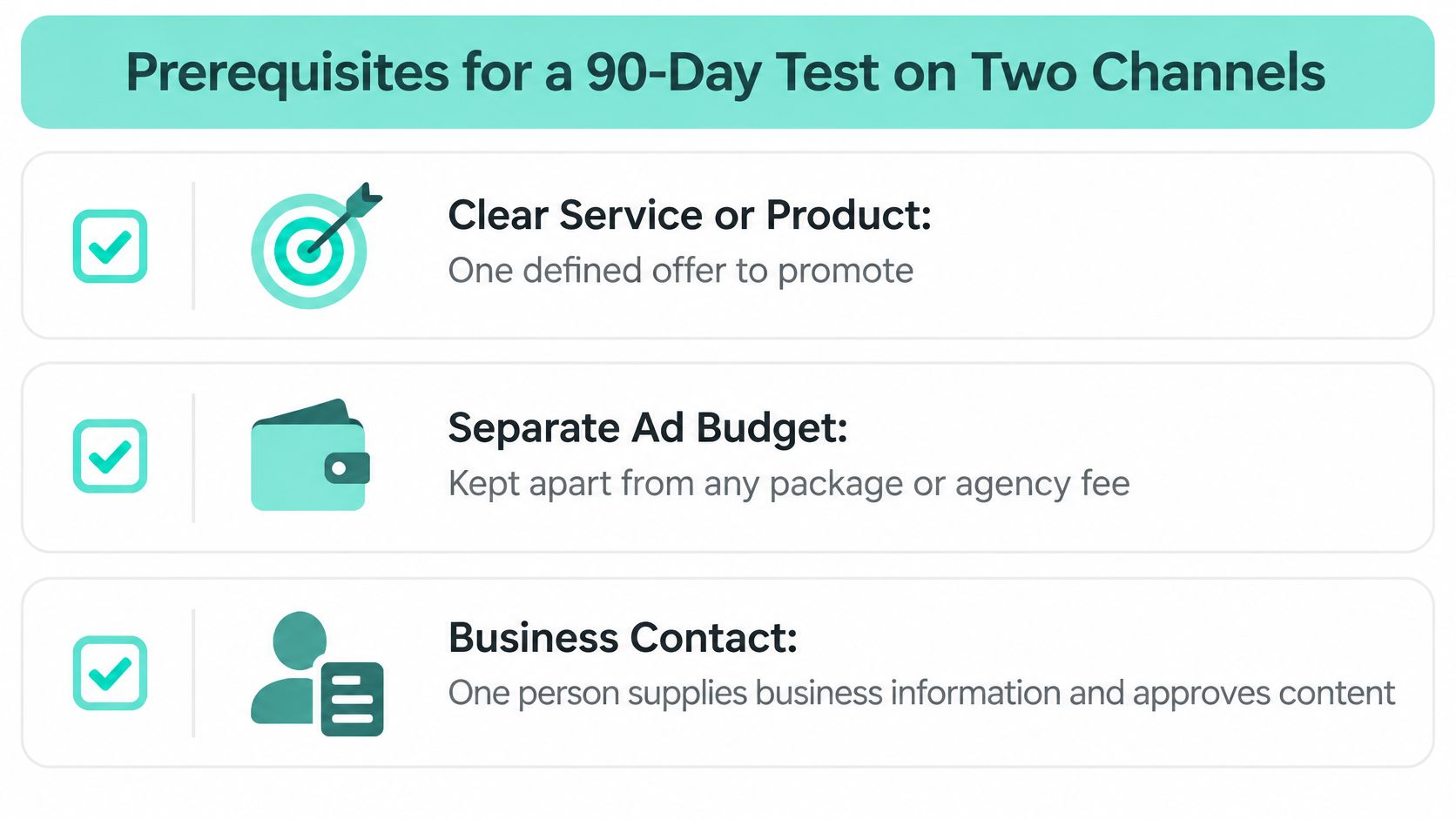
Before choosing a package, you should have a clear service or product to promote, an advertising budget separate from the package fee, someone to supply business information and approve work, a team member to respond to inquiries, and a way to share lead quality and sales feedback.
This checklist covers the essentials before day one.
Prerequisites before you spend
- Clear offer: One defined service or product to promote.
- Separate ad budget: Kept apart from any package or agency fee.
- Named approver: One person supplies business information and approves work quickly.
- Named responder: Someone answers inquiries within a set time.
- Feedback loop: A way to send lead quality and sales outcomes back to each channel.
The 90-day plan
- Days 1-14: Choose your primary and support channel, build or fix one landing page, and set up conversion tracking.
- Days 15-30: Launch with a fixed budget and record baseline metrics. Don't optimize yet.
- Days 31-60: Change one variable at a time, such as offer, headline, or audience, and log each result.
- Days 61-90: Compare cost per qualified inquiry and revenue by channel. Keep the winner, cut the rest.
Paid campaigns start collecting data soon after launch, while content and organic search need longer. Judge organic channels on leading indicators during the test, such as indexed pages and branded impressions, until the window closes.
If cost per qualified inquiry is within target after 90 days, add budget. If it isn't, fix the page and the queries before spending more.
That's how to get traffic to your site without guessing. Two channels, one fixed page, one shared definition of a qualified inquiry, and a decision date.
If you want those two channels, landing page, content, and follow-up planned and managed as one system, SimpleLab Digital builds connected monthly plans for small businesses and law firms and measures success by qualified inquiries, not visits alone. You can book a call for recommendations around your goals, budget, and current marketing, or select services directly. Start at SimpleLab Digital and pick the starting point that fits your next 90 days.