Only 70% of solo practitioners had websites in 2024, compared with 100% of firms with 100 or more attorneys, according to the American Bar Association's 2024 Websites and Marketing TechReport. That gap is your opening. Effective content marketing for law firms isn't a busier blog. It's an intake system where every page answers a real question, passes attorney review, and leads to one tracked next step.
Table of Contents
What a Law Firm Content Program Includes
Most small firms don't have a marketing department. In 2023, 58% of surveyed law firms reported that attorneys performed marketing activities within their firms, according to the American Bar Association's Legal Technology Resource Center Legal Technology Survey. Plan for that reality. You need one attorney reviewer and one staffer who produces, not a large team.
The diagram below shows who owns review and production before anything gets published.

A working program has six layers working together. Topic research feeds core pages, explainers and video draw from those pages, and upkeep plus distribution keep them found and measured.
| Program layer | Monthly output for a small firm | Owner |
|---|---|---|
| Topic research | 10-15 questions from intake calls and consultations | Intake lead and managing attorney |
| Core practice-area pages | One page per priority practice area, reviewed quarterly | Attorney reviewer and marketing lead |
| Blog articles | 2-4 explainers, each tied to one practice area | Writer with attorney review |
| Short videos | 4-8 clips cut from attorney explanations | Editor with attorney sign-off |
| SEO and page upkeep | Monthly check of titles, headings and internal links | Marketing lead |
| Distribution and measurement | Weekly posting schedule and monthly lead report | Marketing lead and office manager |
Start narrow. Pick one priority practice area per month, publish two to four explainers tied to it, and cut four to eight short clips from the attorney's recorded answers. That cadence is sustainable because one recorded explanation feeds several formats.
Planning test: A piece gets scheduled only if it names one practice area, answers one client question, and points to one next step.
That next step might be a consultation request, an intake form, or a preparation checklist. If you can't name all three, don't write it yet. You're building a library that moves a reader toward contact, not filling a calendar.
How to Choose Topics Clients Actually Search
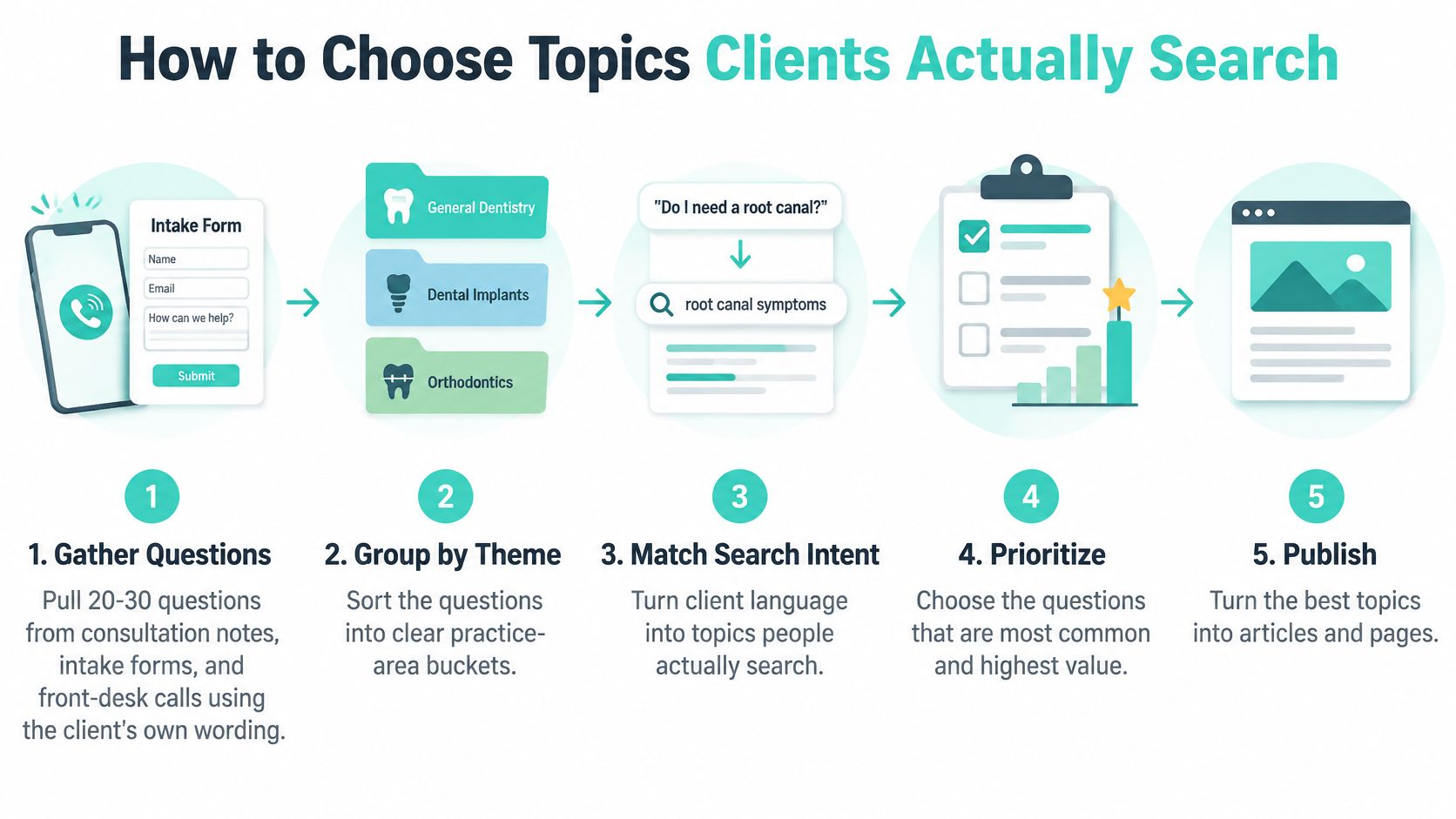
Client questions make better starting points than a list of keywords. Use them to build an intake system: each topic should address a real concern, pass attorney review, and help a reader understand what to do next.
- Collect client questions. Review consultation notes, intake forms, and front-desk calls. Keep the wording clients use, then remove identifying details before turning questions into briefs.
- Group questions by practice area and decision stage. Early questions often concern whether a situation calls for legal help. Others ask about process and timing; closer to hiring, people want to know what happens first.
- Assess demand and intake relevance. Consider whether people search for the topic and whether it connects to a consultation. A broad question may attract attention, while a specific question may better reflect readiness to hire.
- Choose a format that fits the question. A practice-area page can explain the wider process; an explainer can answer one question. Use FAQs for recurring intake questions and short video for a single step or misconception.
- Set the legal scope and review requirements. Identify the relevant jurisdiction, assign an attorney reviewer, and include a review date. These details help keep the answer relevant and current.
- Define the next step and tracking. Specify the consultation form, intake form, or other action the page should point to. Track inquiries from that page so the firm can assess whether the content leads to appropriate consultations.
Clarity about the process matters. In Clio's client intake and legal trends guide, 30% of prospective legal clients reported that law-firm websites made the hiring process easy to understand, while 14% said they could easily find pricing information. Use topic briefs to identify the practical information a visitor needs, such as what to prepare and what happens after making contact.
For help structuring a search-focused draft around reader intent, see a content creator's guide to SEO.
The short walkthrough below covers topic selection.
Audit Every Priority Page
Before publishing, check four things: Does the page address a specific client problem? Is its jurisdiction clear? Is an attorney named as author or reviewer? Does it offer one prominent next step?
Skip generic posts that bring visits without helping readers assess their situation or contact the firm. A focused explanation of a custody-modification question in a particular state gives readers a clearer basis for deciding what to do than a broad national summary.
Blog and Short Video Formats Compared
Each format does a different job in the path to a consultation. Match effort to role, and don't expect a short clip to carry the detail a practice-area page must hold.
| Format | Best for | Production effort | Shelf life | Where it converts |
|---|---|---|---|---|
| Practice-area page | Process, eligibility and next step | High upfront | Long, with yearly review | Consultation or intake form |
| Explainer blog | One specific client question | Medium | Medium, may need updates | Link to the practice-area page |
| FAQ article | Questions repeated at intake | Low to medium | Long if kept current | Contact prompt at the end |
| Short video | One step or one myth | Low per clip, reusable | Short to medium, platform dependent | Link in caption to the landing page |
Practice-area pages carry process, eligibility, timing, and the next step. They need the most work and the closest attorney review because they're the page a ready prospect lands on. Explainer blogs answer one question well and link back to that core page instead of trying to cover the whole practice area.
FAQ articles collect questions your intake team hears weekly. End each answer block with a contact prompt, because a reader checking three FAQs in a row is signaling real interest. Short video works best at one step or one myth per clip. If you're planning that format, these short-form video ideas for lawyers give starting prompts tied to common client questions.
One Question, Several Formats
Say a family law firm hears the same question about modifying custody orders. The attorney records a careful answer once. The team writes one explainer from it, cuts two clips covering what a court looks at and what documents to gather, and adds the question to the family law FAQ.
Every clip needs a caption or description linking to the matching practice page. A video without that link is entertainment, not intake.
Publish a transcript with each clip. Transcripts help readers who scroll past video, support accessibility, and give search systems the same answer in text. One attorney session then produces a page update, an article, two clips, and an FAQ entry, all pointing to the same consultation step.
SEO Structure and Schema That Help Pages Get Found
Match your markup to the actual page, then validate it. The table below keeps that decision simple.
| Page type | Markup to use | Check before publishing |
|---|---|---|
| Blog article | Article | Rich Results Test passes and the page is indexable |
| Office or contact page | LocalBusiness | Address and hours match the Google Business Profile |
| Single question with user answers | QAPage | Use only when the page is built around that one question |
| Multi-question FAQ page | No QAPage markup | Do not use QAPage; confirm the current supported type before marking up |
| Any page | None required | Check robots.txt, noindex tags and login walls |
Start with page basics. Put one practice area and one city in the title and main heading. Keep a clean H2 and H3 hierarchy so a reader sees the structure before reading every word.
Give each major section a unique ID and link to it from the table of contents with descriptive labels. Use "Estate Planning Costs" or "What Happens at a First Consultation," never "More Information." Descriptive headings help scanners jump to eligibility, timing, or fees, and they help people using assistive technology move between headings.
Add an author line with credentials, a jurisdiction label, and a last-reviewed date. That gives readers and AI summaries a way to judge the source. A fuller law firm SEO strategy for modern client acquisition connects these page-level steps to your wider local presence.
Match Markup, Then Validate
Google states that structured data helps its systems understand page content and can make pages eligible for richer search-result features, in its Article structured data documentation. Use Article markup for blog posts and LocalBusiness markup for office information. Reserve QAPage for a page focused on one question followed by user-submitted answers. Don't label an ordinary multi-question FAQ as QAPage.
Then run the workflow in order:
- Validate the markup: Run the Rich Results Test and fix errors before publishing.
- Check Google's view: Use URL Inspection to confirm the page renders as expected.
- Confirm crawlability: Make sure robots.txt, a noindex tag, or a login wall isn't blocking the page.
- Submit your sitemap: Keep Google informed of new and updated URLs.
Using AI Drafts and Chatbots Within Ethics Limits
Treat any page, post, caption, or chatbot script drafted with generative AI exactly like a human draft. It goes through the same attorney review, and your approval log records that the attorney checked facts, jurisdiction, and claims. The reviewing attorney owns the result, so AI speed doesn't reduce responsibility.
Sort output into three bins before anything is scheduled:
- Green: General process information an attorney has verified against current rules.
- Amber: Anything mentioning a deadline, fee, timeline, or statute. It needs a jurisdiction check first.
- Red: Outcome descriptions, comparisons with other firms, or advice on a specific situation. An attorney rewrites it before use.
For teams formalizing that review trail, evidence trails for AI-assisted filings from IamVera.AI outlines how documented checks support accountability for AI-assisted work.
Chatbots need three safeguards. The first message states the tool gathers information and doesn't give legal advice. A human handoff happens within a stated response time. Urgent or deadline-driven questions stop the automated flow and route to a phone line.
Each month, read your own pages through AI search summaries as a prospect would. Correct the source page wherever a summary is inaccurate, and review a sample of chatbot transcripts after applying your confidentiality rules.
Distribute Approved Content and Check It First
Nothing gets scheduled until it passes a review gate. That gate applies to every page, post, video, and ad, because each one communicates something about your services.
The review below is easier when two people check claims against source records together.

ABA Model Rule 7.1 prohibits material misrepresentations of fact or law and omissions that make a communication materially misleading, under the ABA Model Rule 7.1 text. Apply it claim by claim. Sort each statement into general legal information or case-specific advice, and label general statements as general.
Substantiate every outcome or experience claim with records. Remove guarantees such as "you will win," because statements creating an unjustified expectation about results are prohibited. Document support for any comparison with other firms before publication, since comparisons are permitted only when they can be factually substantiated.
Check jurisdiction-specific advertising rules and confidentiality risks for each piece. Record in the approval log that a disclaimer alone doesn't fix a misleading claim. The wording itself must be accurate.
Distribute in a Fixed Order
Once a piece passes, distribute it the same way every time:
- Post on LinkedIn first. Share the explainer with one practical question. LinkedIn was used by 87% of firms that maintained a social presence in the ABA's 2022 Websites and Marketing TechReport, so it's where professional audiences already are.
- Email recent contacts. Send the clip or article to your list with one sentence on who it helps.
- Update your Google Business Profile. Add the page so local searchers see current material.
- Link from your most visited articles. Point existing traffic to the practice-area page.
Consistent posting gets easier with a planned system like social media management for law firms rather than ad hoc sharing. Keep one spreadsheet of published URLs, review dates, and the approving attorney. That trail answers questions later without guesswork.
Measuring Content by Consultations and Matter Quality
Treat capture and follow-up as one workflow, not separate projects. The sequence below connects a page to a retained matter.
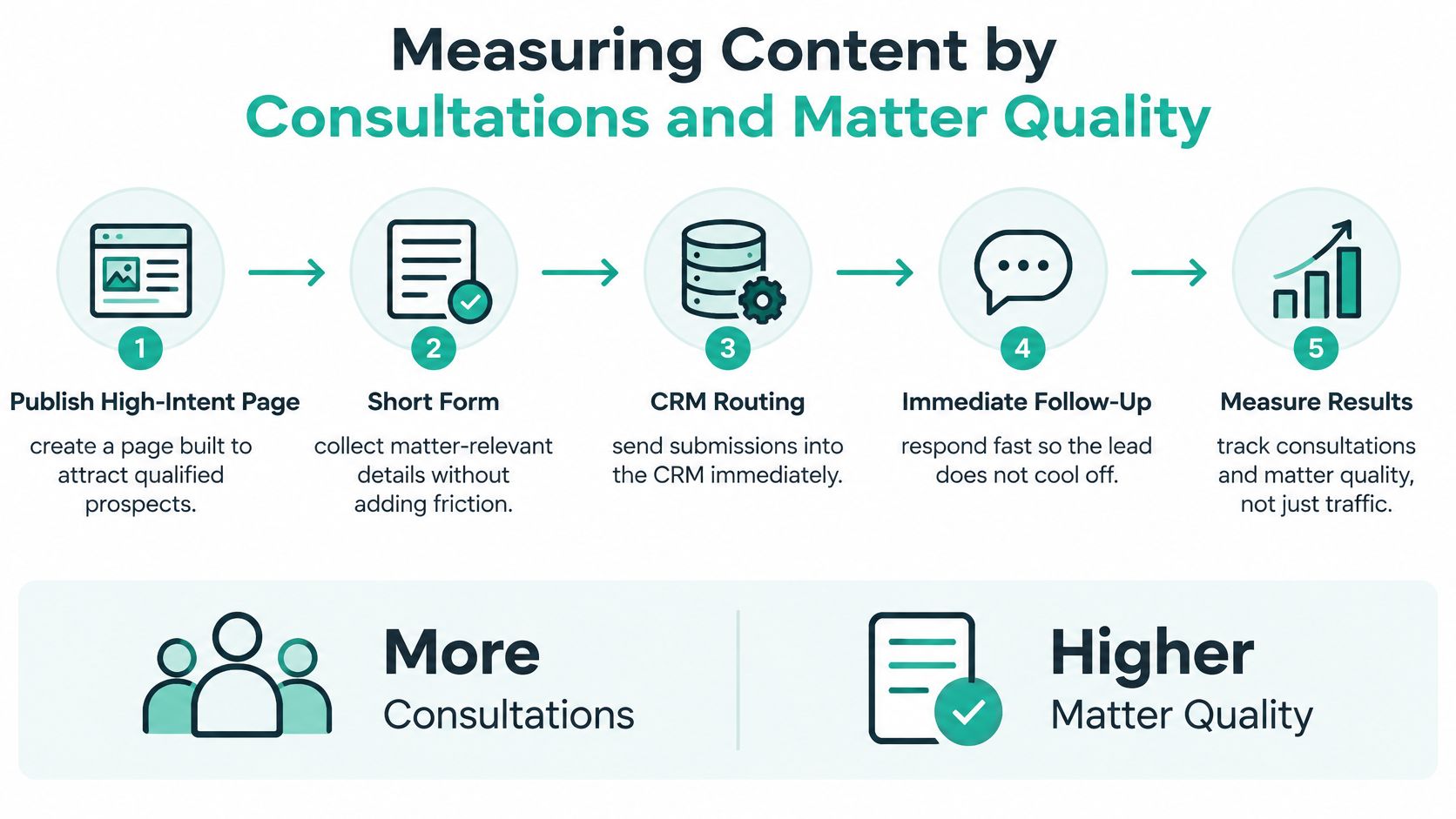
Publish a high-intent page. Use a short form that still collects matter-relevant details. Route submissions into your CRM, send an immediate confirmation, and set a human response time. Then track what happens after the click.
Solo firms using combinations of online intake forms, schedulers, e-signatures, search ads, and text messaging experienced 48% more client leads and 53% higher revenue, in data reported in Clio's Legal Trends Report. Treat those figures as associations, not guaranteed lift. They show why the workflow matters, not what your firm will get.
| Metric | Where to track it | What it tells you |
|---|---|---|
| Form completion rate | Website analytics on the intake page | Whether the form asks for too much |
| Consultations booked and attended | Intake or scheduling tool | Whether inquiries are real and prepared |
| Qualified-lead rate | CRM, tagged by practice area | Whether content draws the right matters |
| Retained matters | CRM with source tags | Whether the content leads to paying clients |
| Revenue by content source | CRM plus billing records | Which topics justify more production |
Set a 30-day baseline before you test anything. Then run one controlled test at a time. Compare a long form against a five-field form, or an immediate text confirmation against email only. For a broader framework on choosing what to track, key indicators of content success from TheContentMap helps separate vanity metrics from business outcomes.
Our own planning follows the same logic. Ads create the first opportunity, a landing page explains the next step, content gives people more context, and follow-up keeps the conversation moving. A practical guide to measuring law firm marketing ROI shows how to tie those stages together in reporting.
A page with modest traffic and steady qualified consultations beats a viral post that produces none.
Watch for four pitfalls. Don't ask for sensitive facts before conflicts screening. Don't let unqualified inquiries book straight onto the attorney calendar. Document consent before sending text messages. And don't optimize for lead volume while ignoring matter quality and downstream revenue.
Confirm Your First 90-Day Plan
Make five decisions this week:
- Choose one practice area and the single client question its first page answers.
- Name owners for topic research, attorney review, and responding to inquiries.
- Set up the review checklist and approval log before the first page goes live.
- Start your 30-day baseline for form completion and consultations.
- Publish across the quarter: one practice-area page and two explainers in month one, then two to four explainers monthly and four to eight clips from attorney answers, reviewed monthly.
Before planning any piece, apply the three-part test from the first section. A structured 90-day law firm marketing blueprint can help you sequence those decisions. You'll also need a specific practice to promote, an advertising budget separate from any service fee, someone to supply information and approve work, a team member who answers inquiries quickly, and a regular way to share lead quality feedback. Support is available as individual services or in packages starting at $990 USD per month, with advertising spend separate.
If you'd like help building content marketing for law firms as a tracked intake system, with practice-area pages, short video, landing pages, and follow-up planned around the matters you want, visit SimpleLab Digital to compare individual services and monthly packages. Bring one priority practice area and your most common client questions, and we'll help you turn them into reviewed pages that lead to consultations.