It's 9pm on a Thursday and the draft is half finished. A partner asks whether the piece counts as advertising, someone notices the list mixes clients in Toronto with prospects in Denver, and nobody can say who last checked the unsubscribe link. The edition sits in drafts for another three weeks.
The stall is the problem. A monthly newsletter works when it is run as an intake tool with two gates before every send: a documented compliance review for the jurisdiction and audience, and an accessibility check for the email itself. One topic, one audience, one next step, one named reviewer. Steady monthly editions are still uncommon; disciplined review is what makes yours stand out.
Table of Contents
- What a Law Firm Newsletter Should Do and How Often to Send It
- Newsletter Topics for Each Practice Area
- Three Example Editions for Estate Planning, Employment and Business Firms
- Editorial Checklist and Ethics Review Before Every Send
- Permission and Unsubscribe Workflow for U.S. and Canadian Contacts
- Newsletter Metrics Worth Tracking Beyond Opens
- Launch Your First Monthly Edition This Month
What a Law Firm Newsletter Should Do and How Often to Send It
A newsletter keeps clients, prospects and referral sources warm between matters, and it gives each of them a reviewed path to a consultation. Treat it as the top of your intake funnel rather than a firm announcement board.
Adoption is real but uneven. The ABA's 2023 Legal Technology Survey on websites and marketing reported newsletter use by 41% of respondents' firms in 2023, while only 5% of solo practitioners reported sending an email newsletter in 2021. For a solo or small firm, that gap is the opportunity: a consistent educational edition is still uncommon in your competitive set. According to Spotlight Branding's Legal Marketing Trends Report 2024, 28% of law firms reported sending email newsletters at least monthly in 2024.
Four formats, four risk levels
| Format | Main purpose | Typical audience | Suggested cadence | Call-to-action risk |
|---|---|---|---|---|
| Monthly practice digest | Explain one development and one practical topic | Clients, prospects, referral sources | Monthly | Low to medium: soft next step |
| Practice-area alert | Flag a rule, deadline or legal change | Subscribers in one practice area | Only when a change is relevant | Medium: keep it educational, not a solicitation |
| Client update | Share firm news and service changes | Current clients who opted in | Quarterly or as needed | Low: confirm the list is client-only |
| Referral-partner update | Share practice-relevant notes for referrers | Accountants, realtors, other attorneys | Quarterly | Medium: no payment or reward for referrals |
I'd start a limited-staff firm on the monthly practice digest and nothing else. Alerts feel productive but they tie your calendar to news, and a quiet month becomes a skipped month.
Frequency isn't the safety variable
Bar guidance on what bar rules allow in a firm email newsletter treats editions that praise the firm's expertise or urge recipients to contact it as solicitations of professional employment. A quarterly edition with a hard sell can carry more exposure than a monthly explainer with a soft link. Review by purpose and audience, not by the label "newsletter".
Practical rule: If you can't name the audience and the single next step in one sentence, the edition isn't ready to draft.
List hygiene sits underneath all of this. Bounces and stale addresses distort every number you'll later report, so use CleanMyList's guide to keep newsletter compliance in check before your first send.
Your first step this week: pick one practice area and one audience for edition one.
Newsletter Topics for Each Practice Area
Two topic types fill a calendar. Evergreen explainers stay useful for months (wills versus trusts, entity choice, what to bring to a first meeting). Timely notes attach to a development, a deadline or a rule change, and they expire fast.
Teach before you ask. A newsletter earns attention by answering a question the reader already has, and the request for a consultation rides along at the bottom. In an industry survey conducted in June 2025, 86% of legal professionals surveyed had read a legal newsletter or email bulletin, compared with 37% who visited legal-media websites. That survey covered Australian private-practice professionals, so read it as evidence the format still gets opened, not as a global forecast.
Mapping topics to a next step
| Practice area | Evergreen topic | Timely topic type | Reader question | Matching next step |
|---|---|---|---|---|
| Estate planning | Wills versus trusts basics | New filing or tax-rule change | Do I need a will, a trust or both? | Estate planning consultation request |
| Employment | Documenting workplace policies | New agency guidance or leave-law change | Are our handbook and notices current? | Employment practice page |
| Business law | Choosing an entity type | Corporate filing deadline or reporting change | Which entity fits my plans? | Business formation consultation request |
| Family law | Preparing for a first meeting | Court procedure update | What should I bring to a consultation? | Family law intake form |
| Real estate | Closing checklist explained | Local recording or disclosure change | What documents should I review before closing? | Real estate practice page |
| Personal injury | Deadlines and what triggers them | Statute or verdict trend update | When should I contact a lawyer? | Case review request |
| Immigration | Documents to gather before filing | Form or processing update | What is the first step for my case? | Immigration consultation request |
Three operating rules keep this table honest:
- One main topic per edition: add at most one short second item, never five. Readers scan on a phone.
- Every timely item carries a citation and a jurisdiction label: name the state or province in the sentence, so a reader in another jurisdiction doesn't act on it.
- Pending matters stay out entirely: no commentary on a case the firm is handling, however tempting the anecdote.
Referral audiences need their own angle. Accountants and bookkeepers respond to deadline-driven content, and HeyNews on accounting firm newsletters is a useful reference for how that profession structures a recurring edition before you build a partner version.
A three-month queue for one estate planning firm
- Month one, evergreen: wills versus trusts, next step is a planning-meeting request.
- Month two, timely: a state-specific probate or filing change, cited and labelled, next step is the practice page.
- Month three, evergreen: funding a trust after signing, next step is a document checklist download.
Alternating the two types means a quiet news month never cancels an edition. If you need a repeatable way to generate and schedule those topics, our step-by-step content marketing plan for law firms walks through building the queue once and reusing it.
Three Example Editions for Estate Planning, Employment and Business Firms
The template below stays fixed. Only the subject line, lead item, checklist and audience segment change between practice areas.

Estate planning edition, in full
Subject line: Five questions before naming a guardian
Preview text: A short checklist to work through before your planning meeting.
Audience: clients who opted in, plus prospects who requested planning information.
Lead item, in plain language: naming a guardian in your will is how you tell a court who you want raising your children if you can't. It's a nomination, not an automatic appointment, and a judge still reviews it. Before a planning meeting, confirm the person you'd name has agreed, and check whether your will reflects your current family situation.
Then the checklist:
- Who would care for the children: name one person, and say why they fit.
- Is a backup named: a second choice covers the case where the first can't serve.
- What the children need day to day: school, routine, medical care, location.
- Are the finances arranged: who manages money for the children, and how.
- When was the will last reviewed: a birth, a move or a death in the family usually means it's time.
Call to action: "Request a planning meeting" linking to the estate planning intake form.
Attribution and disclaimer: the responsible attorney's name appears under the lead item, and the footer states that the edition is general educational information, not legal advice for your situation, and that reading it doesn't create an attorney-client relationship.
No client matter appears anywhere in the draft. For the campaign structure around an edition like this, our estate planning marketing campaign blueprint shows how the email, page and follow-up fit together.
Employment edition
Subject line: Is your handbook ready for the next leave-law change?
Audience: employer clients and HR contacts who opted in.
The lead item walks a policy review checklist: which leave policies reference a specific statute, who owns the update, when the handbook was last distributed, whether acknowledgements are on file, and how managers escalate an accommodation request. The jurisdiction label sits in the first paragraph, because a multi-state employer can't apply one rule everywhere.
Call to action: request a policy review. Keep the wording service-neutral, and don't imply the reader is already out of compliance. That implication is where an educational piece drifts toward a pitch.
Business edition
Subject line: Sole proprietorship, LLC or corporation, what changes
Audience: founders and owner-operators on the prospect list.
The lead item compares the three structures at a high level: liability separation, formalities and record-keeping, and how ownership changes get documented. It doesn't recommend one structure, because that depends on facts the email doesn't have.
Before the consultation link, ask readers to confirm two things: their formation documents and their filing dates. That single request improves intake quality more than any subject line test, because the first call starts with documents instead of background.
Same template, same review steps, different segment. If a draft needs a new disclaimer or a new call-to-action pattern, it needs a new review, not a faster send.
Editorial Checklist and Ethics Review Before Every Send
Every edition passes a documented review with a named reviewer and an approval date before the send button is enabled. The ABA's guidance on avoiding ethical violations in internet marketing points to Model Rules 7.1 and 7.2 as the baseline: no false or misleading communications, review and approval before publication, identification of the responsible lawyer or firm, and no payment for recommendations.

The eight-item pre-send checklist
- Advertising label: confirm the exact wording and placement your jurisdiction requires, including any legend on the envelope or subject line.
- Substantiation: every outcome, figure, credential and date traces to a source file the reviewer can open.
- Confidentiality screen: no client detail, no identifiable fact pattern, unless written permission and the applicable rule allow it.
- Educational disclaimer: present in the email footer and on any linked page.
- Attribution: author named, responsible lawyer identified.
- Opt-out and footer: click the unsubscribe link in a test send, confirm the physical address renders.
- Accessibility basics: heading order, meaningful link text, alt text on diagrams, readable contrast.
- Record: reviewer, approval date, jurisdiction, sources, and the exact version sent, saved as one file.
Risk usually arrives through implication rather than a false sentence. A case result quoted without comparable facts can suggest an expected outcome even when every word is accurate, which is why outcomes and disclaimers get checked together, not separately.
The accessibility gate
An Email Markup Consortium analysis of 443,585 emails collected between May 2024 and May 2025 found 99.89% contained serious or critical accessibility issues. Legal editions carry deadlines, rights and procedural options, so a broken heading structure or a "click here" link isn't cosmetic.
Before send, the reviewer tests heading order with a screen reader, reads every link out of context to check it makes sense alone, adds alt text to any diagram, tabs through the linked landing page by keyboard, and checks contrast on a phone in daylight. A plain-text alternative doesn't rescue an inaccessible PDF or preference centre.
State and provincial rules control in practice. Treat the Model Rules as a floor, and take jurisdiction questions to bar counsel or an ethics adviser before the edition ships.
Permission and Unsubscribe Workflow for U.S. and Canadian Contacts
The two countries run on different models. The United States uses an opt-out regime for commercial email; Canada generally requires consent before you send.
The FTC's CAN-SPAM compliance guide for business requires accurate From, To, Reply-To and routing information, no deceptive subject lines, clear identification of the message as an advertisement, a valid physical postal address, and a clear, conspicuous opt-out that keeps working for at least 30 days after sending. Each separate violating email may carry a civil penalty of up to $53,088.
Canada's Anti-Spam Legislation works from the other direction. ISED's guidance on getting consent to send email sets out prior consent, sender identification with a current mailing address plus a phone number, email address or website, and a readily performed, no-cost unsubscribe. The CRTC's CASL FAQ confirms consent may be express or implied and that commercial messages must stop within 10 business days of an unsubscribe request.
| Requirement | U.S. (CAN-SPAM) | Canada (CASL) |
|---|---|---|
| Consent model | Opt-out model for commercial email | Prior consent required, express or implied |
| Sender identification | Accurate From, To, Reply-To and routing information | Identify the sender and provide prescribed contact information |
| Postal address | Valid physical postal address | Current mailing address plus phone, email or web contact |
| Unsubscribe | Clear, conspicuous method working for at least 30 days | Readily performed, no-cost mechanism processed within 10 business days |
| Advertising label | Clearly identify the message as an advertisement | No separate ad label in the CASL guidance, identification duties apply |
| Penalty reference | Up to $53,088 per separate violating email | Confirm current amounts with the CRTC |
Six steps that work for a mixed list
- Record the join: store how and when each contact subscribed, the form or intake step used, and the wording they saw.
- Tag by country: one field, populated at signup, driving which footer and consent logic applies.
- Separate edition types: flag informational editions apart from promotional ones so the review and the consent basis match the content.
- Suppress automatically: every send pulls the suppression list at send time, not at list export.
- Use the shorter window for everyone: process opt-outs inside the Canadian timeframe across the whole database, which removes the need to police two clocks.
- Share one suppression list: email platform, SMS tool and any event or webinar system read from the same source.
Text messages need their own consent record. CASL covers commercial texts under the same consent rules, so a Canadian phone number collected for texts needs documented consent covering that channel. U.S. text-message obligations sit outside the sources cited here, so confirm them against official guidance before any SMS step enters the workflow. Other state, provincial and privacy laws may add duties, and each belongs in the workflow only after someone checks the statute or regulator directly. Our lawyer email marketing compliance guide covers how to document that review without stalling every campaign.
Newsletter Metrics Worth Tracking Beyond Opens
Benchmarks are a monitoring baseline, not a target. Mailchimp's email marketing benchmarks report a 31.35% average open rate, 2.78% average click rate and 0.15% unsubscribe rate for its Business + Finance category, against 35.63%, 2.62% and 0.22% across all users. That category is broader than legal services, and privacy protections plus automated image loading distort opens in both directions.

| Metric | Business + Finance benchmark | All-users benchmark | What it tells a law firm |
|---|---|---|---|
| Open rate | 31.35% | 35.63% | Directional only; privacy features distort opens |
| Click rate | 2.78% | 2.62% | Shows whether the lead item earned a next step |
| Unsubscribe rate | 0.15% | 0.22% | Early warning that an edition feels too promotional |
| Click-to-qualified-inquiry rate | No published benchmark | No published benchmark | Set your own baseline by practice area |
| Retained matters from newsletter source | No published benchmark | No published benchmark | Tag at intake with UTM and a source field |
The chain that matters
Segment subscribers by practice area, send one specific checklist or explainer, route the click to a matching landing page, and log the consultation request and retained matter in the CRM. An estate planning subscriber who clicks a probate article should land on a probate next step, not the firm homepage.
Two mechanics make that traceable: UTM parameters on every newsletter link, and a required source field at intake that staff can't leave blank. Without the second one, the first is decoration.
Run a simple control. Send a segmented edition and a broad firm-wide edition on the same cadence with the same offer type, then compare qualified inquiries rather than opens. Watch the unsubscribe line after any call-to-action-heavy edition; a jump there tells you the piece read as a pitch before a partner ever mentions it. For connecting those inquiries to revenue, our guide to measuring law firm marketing ROI sets out the reporting structure.
Launch Your First Monthly Edition This Month
Make the decision before the week starts: put edition one on the calendar and name the reviewer. A date without a reviewer becomes a draft that never ships.
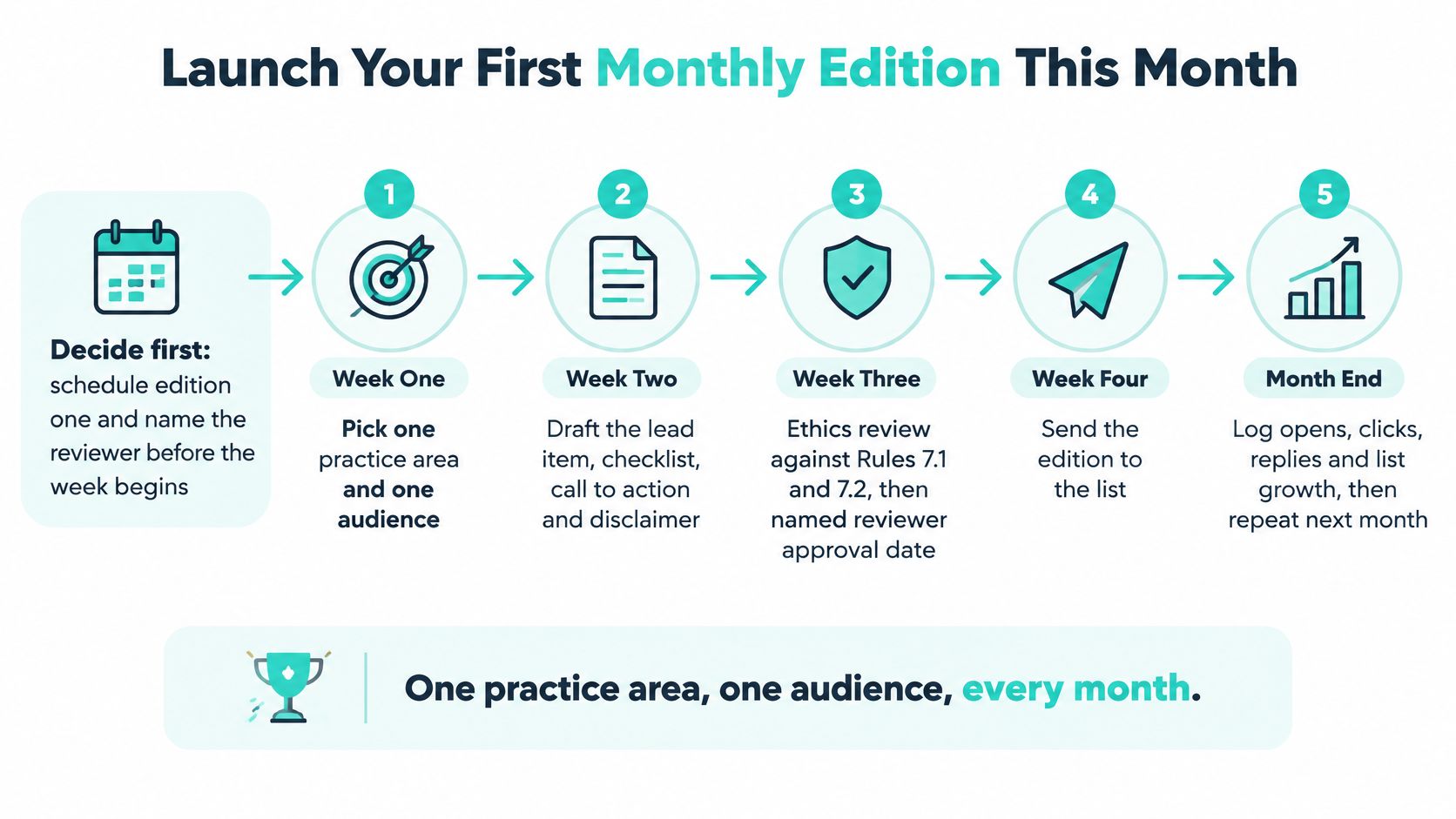
The seven-step monthly workflow
- Week one, choose the slice. One practice area, one audience. Estate planning clients who opted in is a clean starting segment because consent is already documented.
- Pull the topics. One evergreen explainer plus one timely item, with the timely item's citation and jurisdiction label attached at draft stage rather than added later.
- Draft from the fixed template. Subject line, preview text, lead item, checklist, one next step, disclaimer, attorney attribution. Writing to a template is what makes a monthly cadence survivable.
- Run the review gate. Work the eight-item checklist, then record reviewer, approval date and the exact version approved.
- Verify permission and suppression. Check opt-in records and suppression status for both U.S. and Canadian contacts before the list is loaded.
- Schedule with a persistent unsubscribe. Test the footer in an inbox you read, on mobile, and confirm the link resolves after the send.
- Review at 14 days. Compare clicks, qualified inquiries and intake source fields, then write one sentence about what changes next month.
Here's the workflow in practice, including how the review and reporting steps fit around a send.
What to do with the people who don't book
Most readers won't request a consultation this month. That's normal for legal decisions, which is why the newsletter belongs beside a longer follow-up path rather than instead of one. Our walkthrough of an email nurture sequence for legal leads shows how to keep those subscribers moving without turning every edition into a pitch.
For practice-area planning and compliance-aware review across the whole programme, our law firm marketing services cover the topic queue, the landing pages and the intake tracking together. Firms that want the cadence handled for them can look at the Rocket package, which includes four email newsletters per month with design, development and scheduling, plus onboarding, a personal Marketing Guru and results reports every two weeks. It runs on a monthly subscription you can cancel anytime, with no long-term contract.
One practice area, one audience, one reviewed next step, every month. That's the whole system.
SimpleLab Digital plans, writes and schedules law firm newsletters as part of a connected programme, with practice-area topic queues, matching landing pages, compliance-aware review and intake tracking that ties each edition to qualified inquiries and retained matters. If you want a monthly edition that ships on time and passes review before it sends, visit SimpleLab Digital to see the packages and pick the scope that fits your firm.