
Where does local search work begin for a law firm? Most owners answer with the map pack, then keywords, then reviews, in that order. The honest answer starts a step earlier, with a duller question: where are you eligible to appear at all? A firm can spend a month tightening categories and chasing reviews and still lose ground, because the address it's promoting doesn't qualify for a public profile, or because the practice page the profile points to answers a different question than the client typed.
The 30 days below fix the order. They keep Maps numbers apart from organic numbers, treat review requests as a confidentiality workflow rather than a count to grow, and finish with figures a partner can defend in a Monday meeting.
Table of Contents
- The 30-Day Local Search Plan at a Glance
- How Google Ranks Law Firms in Local Search
- Check Profile Eligibility Before You Edit
- Measure Maps and Organic Results Separately
- How to Set Up Your Profile and Service Pages
- Build Citations and Practice Pages That Match
- A Compliant Review Workflow for Law Firms
- Start Week One With a Verified Baseline
The 30-Day Local Search Plan at a Glance
What should a law firm get done in its first month of local search work? Start by confirming that each location qualifies for a profile, then set a baseline before changing anything. Eligibility comes first; an ineligible address can turn profile edits into a problem rather than an asset.
The American Bar Association's legal technology survey shows a wide gap in website ownership between solo practitioners and firms with 100 or more attorneys, so a solo attorney's one complete profile and strong practice page carry proportionally more weight. For broader context on how local search fits with other channels, see this digital marketing growth guide for lawyers.
Give each week one clear job. Keep Maps activity separate from organic website performance when recording results.
| Week | Main task | Done when | Metric to track |
|---|---|---|---|
| Week 1 | Confirm eligibility, record offices and hours, capture baseline | Each eligible location has a documented address and client-facing hours | Maps profile views, calls and direction requests; organic website sessions |
| Week 2 | Complete profile categories, services and descriptions; update linked practice pages | Profile fields describe the firm's actual practice areas | Profile views by location; sessions on linked practice pages |
| Week 3 | Check name, address, phone and website across directories; publish or update practice pages | Directory listings match the Business Profile | Citation accuracy; practice page sessions |
| Week 4 | Set up a confidentiality-aware review request workflow and reporting cadence | A written procedure is approved and filed | Review requests sent, reviews received, response time and booked consultations |
A review process needs more than a target count. Specify who may send requests, when to send them, and how staff should avoid sharing confidential information. Track requests and responses alongside reviews received, rather than treating review volume or average rating as the only measure of progress.
Solo versus multi-office. A solo attorney works through the plan for one eligible address and profile. For a firm with several genuine offices, repeat the eligibility and profile checks for each location. Each should have accurate hours and a relevant landing page; report its Maps activity separately so results at one office do not obscure another's.
Start with an export of current figures, not an edit. Save Maps profile views, calls and direction requests separately from organic website sessions. That baseline makes it possible to judge whether the month's work changed visibility, engagement or both.
How Google Ranks Law Firms in Local Search
Google's documentation on this is unusually clear. The Google Business Profile help page on local ranking states that local results are based primarily on relevance, distance and prominence, and that prominence can be influenced by information Google finds across the web, including links, articles and directories.
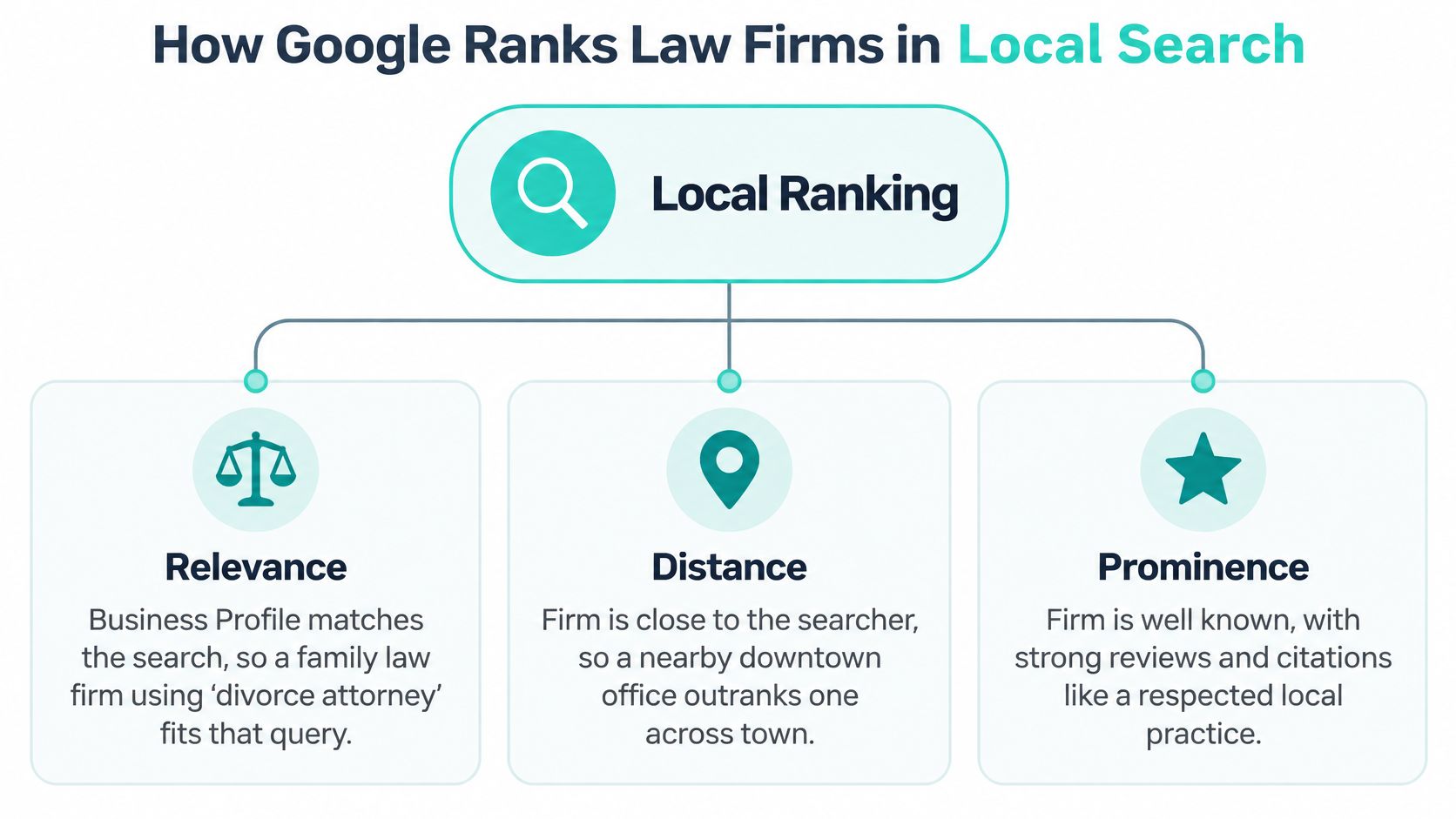
What each factor looks like for a law firm
Relevance is a matching problem. A family law practice whose profile says only "attorney" gives Google almost nothing to match against a divorce search, while a firm that names divorce, custody and support as services and picks Family Law Attorney as its primary category is matched to those queries directly.
Distance is the factor you can't move. A downtown office will usually outrank a suburban one for a searcher standing downtown, and a duplicate listing or an invented office in a nearby city doesn't buy that position, it buys a verification problem.
Prominence is reputation at scale. Reviews, directory presence, articles and inbound links all tell Google the firm is known beyond its own website, and that evidence accumulates slowly.
| Factor | What the firm controls | What it can only influence |
|---|---|---|
| Relevance | Practice areas, services and categories in the Business Profile | How searchers phrase their queries |
| Distance | The real office location and its eligibility | The searcher's location and any location named in the query |
| Prominence | Consistent citations, accurate directory listings and review quality | Links, articles and mentions Google finds across the web |
Where AI answers fit
Maps and organic results aren't the whole page anymore. Informational and hybrid queries increasingly get answered in a generated summary before a searcher reaches a local result, so a firm can hold a solid map position and still be absent from the answer a client reads first. Treat that as an emerging signal worth watching, not settled ranking law.
For a plain-language walkthrough of how the three factors interact in a real market, this is a reasonable place to start.
For teams mapping this into a longer programme, our law firm SEO strategy for modern client acquisition walks through the sequence.
Check Profile Eligibility Before You Edit
Eligibility comes before optimization. Google's guidance on Business Profile eligibility requires a business to make in-person contact with customers during its stated hours. A virtual mailbox, a P.O. box or a rented mailing address doesn't create an eligible office, and publishing one puts the listing at risk of removal exactly when a client is trying to find you.
The common setups sort out quickly.
| Office setup | Qualifies for a public profile | Profile action |
|---|---|---|
| Storefront office where clients meet attorneys | Yes, during stated hours | Claim a public profile with the address shown |
| Firm travels to clients and does not receive them at its address | Service-area setup | Hide the address and list the areas served |
| Virtual office, virtual mailbox or P.O. box | No, not as a client-facing office | Do not create a public office profile for it |
| Multiple genuine offices, each staffed | Yes, per office | Manage one profile for each real location |
| Solo attorney receiving clients at one address | Depends on whether clients are received there | Confirm current Google guidance before publishing the address |
The gate: if a client can't sit across from you at that address during the hours you publish, it isn't an office for profile purposes.
Before anyone edits a field, the intake or marketing lead should record four things for each location: the address, client-facing hours, whether consultations take place there, and the cities or counties served. That record is what you'll hand to a new staff member, an agency or Google support if a listing gets flagged.
A solo attorney works from one address and one profile, so eligibility turns on a single question: are clients received there? A multi-office firm confirms and documents each genuine office separately, then links each profile to its own location page rather than sending every listing to the homepage.
Measure Maps and Organic Results Separately
Combine Maps and organic into one "visibility" figure and you lose the ability to tell which change moved it. The surfaces serve different intent. Someone who taps a map pin is usually ready to call; someone scrolling to an organic result is often still comparing two or three firms.
| Metric | Channel | What it tells you |
|---|---|---|
| Profile views | Maps | How often the firm's listing appears in local results |
| Calls and direction requests | Maps | Intent to contact or visit the office |
| Practice-area rank by search location | Maps | Whether each service surfaces in each area served |
| Landing page sessions | Organic | Traffic reaching practice-area pages |
| Form submissions and booked consultations | Organic | Qualified inquiries and consultations |
| Branded search impressions | Organic | Recognition of the firm name over time |
| AI-answer citations and branded mentions | AI search | Visibility only; leads need separate attribution |
Separate visibility from lead value
A 2025 observational study of local searches in Houston, Phoenix and Denver, published by Whitespark, found AI Overviews appearing for 70% of personal-injury-lawyer queries in each city, while traditional local-pack results appeared for only 30% in Houston and Phoenix and 37% in Denver. The study is geographically limited and observational. The practical lesson still holds: an AI citation is visibility, not a consultation, so give AI-referred traffic its own landing page and its own call or form attribution before you credit it with revenue.
Reporting discipline is where small firms have historically been thinnest. The ABA's 2021 Websites & Marketing report found that 7% of solo attorneys reported having a marketing budget, against 84% of respondents from firms with 100 or more lawyers. Without a budget line, nobody owns the numbers, and nobody checks them.
A ranking report with no practice area and no search location attached is trivia, not a metric.
A solo firm reads one profile and one site. A multi-office firm reports each office's Maps numbers separately and compares them against that office's own practice-area pages, never against a firm-wide average. Review the set monthly, next to the review measures below, and read our guide to measuring law firm marketing ROI for how to connect the top of that funnel to retained matters.
How to Set Up Your Profile and Service Pages
Profile setup rewards precision and punishes shortcuts. Work through these in order.
- Pick the primary category that matches the main work. A divorce practice should select Divorce Lawyer or Family Law Attorney rather than a generic attorney category. The reason is relevance, and the common slip is choosing a broad category that hides what the firm does.
- Add secondary categories only for practice areas you handle. Estate planning, business law or immigration can each earn a secondary slot. Adding categories to chase traffic is the slip, and Google reads the mismatch against your site content.
- List services in client language. "Car accident lawyer" and "wills and trusts" match how people search; "tort litigation" matches nothing. Vague service lists give both Google and readers less to work with.
- Write the description around offices, practice areas and areas served. Two or three plain sentences beat a paragraph of stacked city names, and the description should read like something a client would recognise as their own situation.
- Confirm hours, phone, website and how consultations are booked. The profile has to describe what happens at the office, including whether a Saturday consultation is really available.
- Add real photos of the entrance, the meeting room and the team. Photos of a shared building the firm doesn't occupy misrepresent the office, and clients notice when they arrive.
- Link the profile to one practice page per high-value area. Each major service needs its own page in the firm's market, not one "services" page with eight sections.
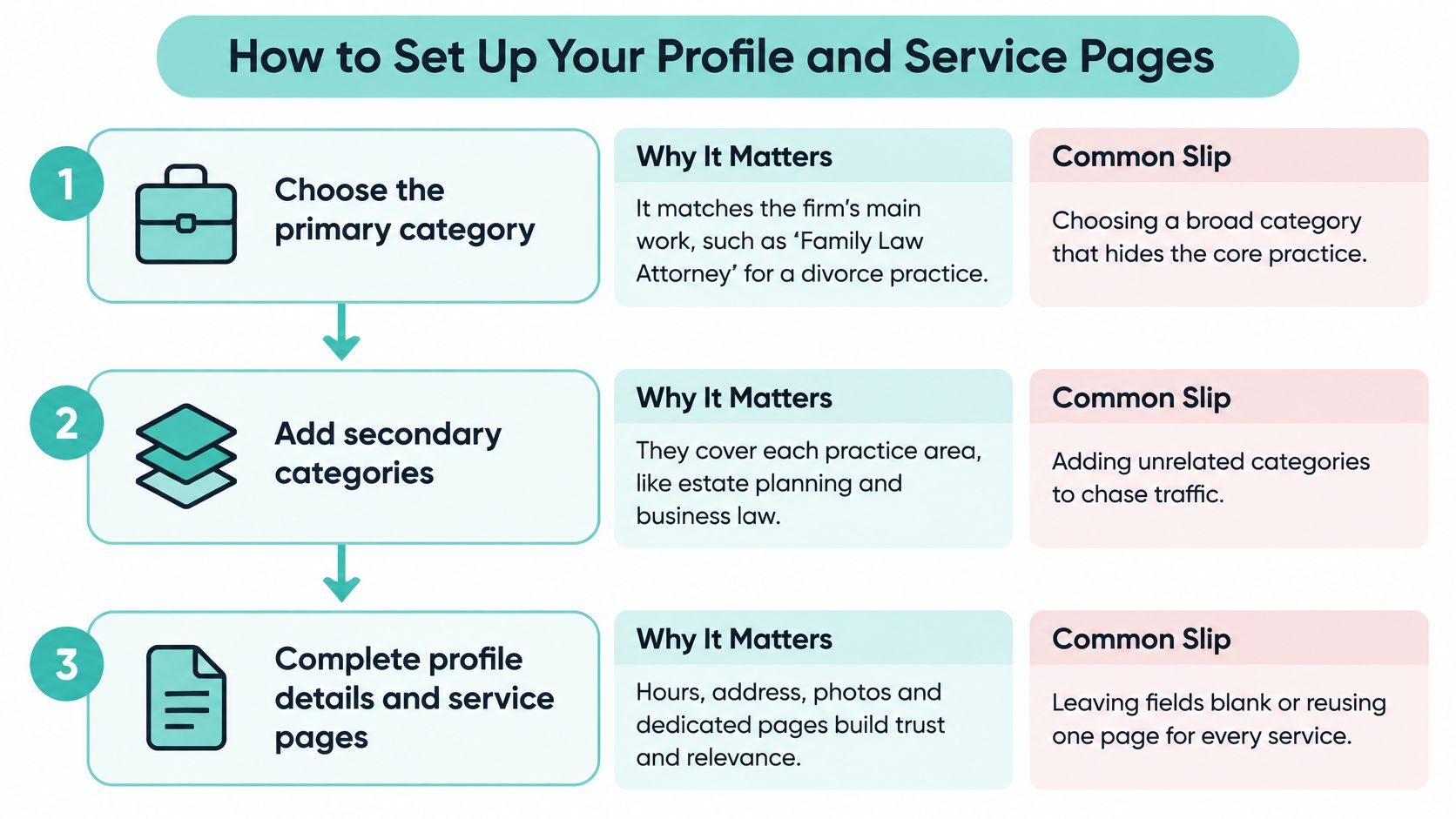
For a multi-office firm, repeat all seven steps for every real location, with each profile pointing to its own location page. The page you attach matters as much as the profile: a focused page on protecting assets from creditors in Clarke County does one job for one market, which is the standard every attached page should meet.
Build Citations and Practice Pages That Match
A citation is any listing of the firm's name, address, phone, website and practice areas on a directory or database. Consistency beats volume every time. Twelve accurate listings do more for a firm than sixty listings where three show an old suite number and two show a disconnected phone line.
Run the audit as a checking routine, not a campaign.
- List every existing listing. Search the firm name alone, the name with the phone number, and the name with the street address to surface what's already out there.
- Build one master record from the Business Profile. Exact firm name with punctuation, suite format, phone number and website. That record is the reference for every comparison.
- Correct mismatches at the source. Claim the listing and edit it where the directory allows, and submit a correction where it doesn't.
- Remove duplicates instead of adding new listings. A second listing for the same office splits reviews and confuses the verification signals Google reads.
Google's guidance on improving local prominence names links, articles, directories, review quantity and review quality as inputs, and it sets no universal review threshold. That's the reason to treat citations and reviews as two separate assets with two separate owners.
The practice page is the content layer
Say an estate-planning firm links its profile to a page covering wills, trusts and probate in its actual market. The test isn't whether profile views rose, it's whether that page produced booked consultations. Each practice page should state the services offered, the office that serves them, the attorneys involved and one obvious way to make contact.
Pages should describe only services the firm really offers. A page that overstates scope creates the same mismatch problem as an inconsistent address. For the writing side, our content marketing plan for law firms covers how to sequence pages across a year, and a page built around criminal defense with Attorney Angel Lugo shows how narrow a well-aimed practice page can be.
A Compliant Review Workflow for Law Firms
A review request can reveal that someone was a client, and a public reply can disclose confidential information, so the workflow has to protect both people before it optimizes anything. Generic advice to "get more five-star reviews" ignores that risk entirely, and legal advertising rules vary by jurisdiction, which means the procedure needs local sign-off rather than a template copied from another state.

- Use neutral request language. No mention of the matter type, no hint of the outcome, no suggestion that the person was represented.
- Keep participation optional and unremunerated. No discounts, no gift cards, no entry into a draw, and never ask only the satisfied clients, which is review gating.
- Set approval rules for public replies. One named person drafts and approves every response, and the response thanks the reviewer without confirming any client relationship or case detail.
- Move negative reviews to a private channel. Route them to a call from the managing attorney and log that the handoff happened.
- Keep a record. What was requested, from whom, when, through which channel, and what was published.
- Check the rules before launch. Read Google's review policies and the advertising and solicitation rules of every bar or law society where the firm practises, then file the version you approved.
Practical rule: assume anything you write in a review reply will be read aloud in a disciplinary complaint, and draft accordingly.
Take a hypothetical family law firm that receives a one-star review. The approved reply acknowledges the feedback, states that the firm can't discuss client matters publicly, and invites the reviewer to call the managing partner. That reply protects confidentiality and still reads as professional to the next person comparing three firms.
Measure the workflow on recency, practice-area relevance, response time, consultation quality and retained matters. Review count alone tells you nothing about whether the process is safe or useful.
Start Week One With a Verified Baseline
Open a spreadsheet today, before editing anything, and capture the starting position. First, confirm eligibility for each real office using the setup table above, so you know which profile you're allowed to manage. Second, export current Maps and organic numbers by practice area and search location, using the metric lists from the measurement section. Third, pick the single highest-value practice area for the firm and make its page the first update you ship.
Then decide who does the work. Running the 30 days in house is realistic for a solo attorney with one profile and one practice page; it becomes harder once three offices and five practice areas are in scope. If you'd rather hand it over, our law firm marketing page lists the practice areas we build for, from estate planning and family law through immigration, personal injury and bankruptcy, and our SEO/GEO and website maintenance work starts either with an audit plus ongoing optimization or with full optimization of up to 25 pages. A firm that wants a deeper technical sweep before the clock starts can work through our law firm SEO audit checklist first.
The export is the measure for everything that follows. Booked consultations and retained matters decide whether the month worked; profile views only tell you whether anyone looked.
SimpleLab Digital builds and runs the search, content and follow-up work that keeps a firm visible where its clients search, from profile cleanup and citation checks to practice-area pages written for one market. If the next 30 days are more than your team can carry alongside active matters, SimpleLab Digital offers law firm marketing on a monthly subscription with a single point of contact and reporting every two weeks. Start with the baseline export, then bring us the numbers and we'll tell you which page to fix first.