Your website lists personal injury as a service, but intake keeps fielding calls about cases you don't accept while the truck accident work you want barely appears in search. Personal injury lawyer SEO means building pages, local listings, and contact paths around the cases your firm handles. Start by comparing your accepted case types with your existing practice pages, then identify the missing matches.
Table of Contents
- Personal Injury Lawyer SEO Starts With the Cases You Take
- Map Car, Truck and Slip-and-Fall Cases to the Right Pages
- Link Practice, Guide and Office Pages Together
- Win Local Maps Discovery for Each Office
- Build Fast, Defensible Pages for Injury Intake
- How Traffic Becomes Qualified Calls in Practice
- Confirm Your Next Step Before Your Next Campaign
Personal Injury Lawyer SEO Starts With the Cases You Take
Say a driver searches for a car accident lawyer at 9 p.m., two days after a collision. A matching practice page, visible phone number, and accurate Maps profile give that person a clear route to an appropriate attorney, though they don't guarantee the call.
The common mistake is assuming that a broad personal injury page can serve every prospective client. Someone injured in a commercial vehicle collision has different questions from someone who fell in a grocery store. Your pages should explain the relevant service before asking either person to contact intake.
Referrals don't eliminate this work. In 2025, 74% of U.S. legal clients researched a law firm online after receiving a personal referral, according to Scorpion's Law Firm Search Trends Report, summarized by Localogy. That describes research behavior, not a conversion rate or a promise that better rankings produce retained cases.
Planning rule: Build around the cases intake can accept, not every injury keyword a tool can find.
Define the boundaries before publishing
Record accepted injuries, service areas, exclusions, and who approves legal explanations. U.S. state and Canadian provincial advertising requirements need separate review; don't assume a page approved for one jurisdiction is ready for another.
For broader campaign context, Ares's 2026 PI marketing playbook is a companion resource when coordinating injury-specific content with other acquisition work. Keep your firm's own acceptance criteria in charge of the page plan.
List the case types you accept, then mark which ones lack a dedicated page. That inventory is more useful than starting with a target number of blog posts.
Map Car, Truck and Slip-and-Fall Cases to the Right Pages
Case types, the page to build and the search it should match
| Case type | Primary page to build | Sample search to match | Supporting page |
|---|---|---|---|
| Car accident | Car accident lawyer practice page | car accident lawyer near me | Rear-end and intersection collision guide |
| Truck accident | Truck accident lawyer practice page | truck accident attorney in [city] | Commercial vehicle claim guide |
| Slip and fall | Slip and fall attorney practice page | slip and fall lawyer in [city] | Premises liability guide |
| Claim process | Insurance claim process guide | what to do after a car accident | Links to each practice page |
Each injury type needs a primary practice page that explains representation and a supporting educational page that answers an immediate question. The claim process guide is different: it supports relevant services rather than pretending to be a separate legal practice.
Keep the distinction clear. A truck accident practice page should explain what the firm handles, who evaluates the inquiry, and what someone can expect when contacting intake. Its commercial vehicle guide can explain how to organize available collision information without turning into another sales page.
A page that mixes truck collisions with premises liability makes both services harder to evaluate. Narrowing the subject doesn't mean repeating a keyword. It means choosing examples, questions, attorney information, and next steps that fit the same visitor.
Build the cluster in a workable order
- List accepted injury types. Include meaningful exclusions, such as matters the firm refers elsewhere rather than handles directly.
- Assign a primary practice page to each. Check existing pages first so you improve a suitable page instead of creating a competing duplicate.
- Write a supporting educational guide. Choose a question intake can help answer accurately, such as what information to prepare after a commercial vehicle collision.
- Connect the practice page to the handling office. Explain where the team works and which jurisdiction the content addresses.
- Connect the guide back to its practice page. Give readers a relevant path from general information to a consultation request.
When deciding which cluster comes first, use case fit and intake capacity alongside search demand. SemDash's approach to prioritizing keywords by business value provides useful context for that decision. A high-volume topic isn't automatically valuable if your firm can't accept the inquiries it attracts.
Keep injury pages inside the full practice structure
SimpleLab Digital supports firms across personal injury, estate planning, family law, real estate, civil litigation, immigration, criminal defense, employment, business law, and bankruptcy. A multidisciplinary firm therefore needs clear practice navigation, not injury articles scattered among unrelated service pages.
Our personal injury and law firm marketing service provides a place to plan that injury cluster within the broader firm strategy. Keep unrelated practice areas separate, while allowing relevant guides to connect them.
For answer engines and conventional search alike, write a concise answer near the beginning of each guide, identify its jurisdiction, and show the reviewing attorney. These choices help readers assess the information; they don't guarantee AI citations.
The final test is simple: can you name the specific question each page answers and the service it supports? If not, narrow the page before publishing it.
Link Practice, Guide and Office Pages Together
Practice page ↔ matching guide
Practice page ↔ handling office
Guide → related process guide
Office → relevant practices and its Business Profile
That map gives visitors a route through the site without requiring them to understand your navigation. It also makes the relationship between educational information, legal services, and real offices explicit.
Use descriptive anchors such as truck accident lawyer in [city] or what to do after a slip and fall. Replace the bracketed location with the actual office city when publishing. Avoid click here, which gives readers no useful preview of the destination.
Make the next action fit the reader
Near the practice page's phone number, include a short route to office details or consultation information. Put educational links beside the question they answer rather than clustering every link at the bottom.
Say a hypothetical firm has a truck accident page, a commercial vehicle claim guide, and separate office pages. The guide should direct interested readers to the truck accident service, while that service page identifies which offices handle those inquiries. Don't link to an office just because it exists if its team doesn't handle that work.
A useful guide without a relevant service link leaves the reader to work out whether your firm can help.
Use the law firm content marketing plan to assign a destination and next action before drafting supporting articles.
Check the actual paths
During recurring site audits, crawl the site with Screaming Frog or a comparable tool. Look for broken links, redirects to unrelated services, orphaned guides, and competing versions of the same practice page.
Make priority practice pages easy to reach from the homepage through the main practice navigation. Check the links on a phone as well: an accurate link is still awkward if a sticky contact bar covers it.
Win Local Maps Discovery for Each Office
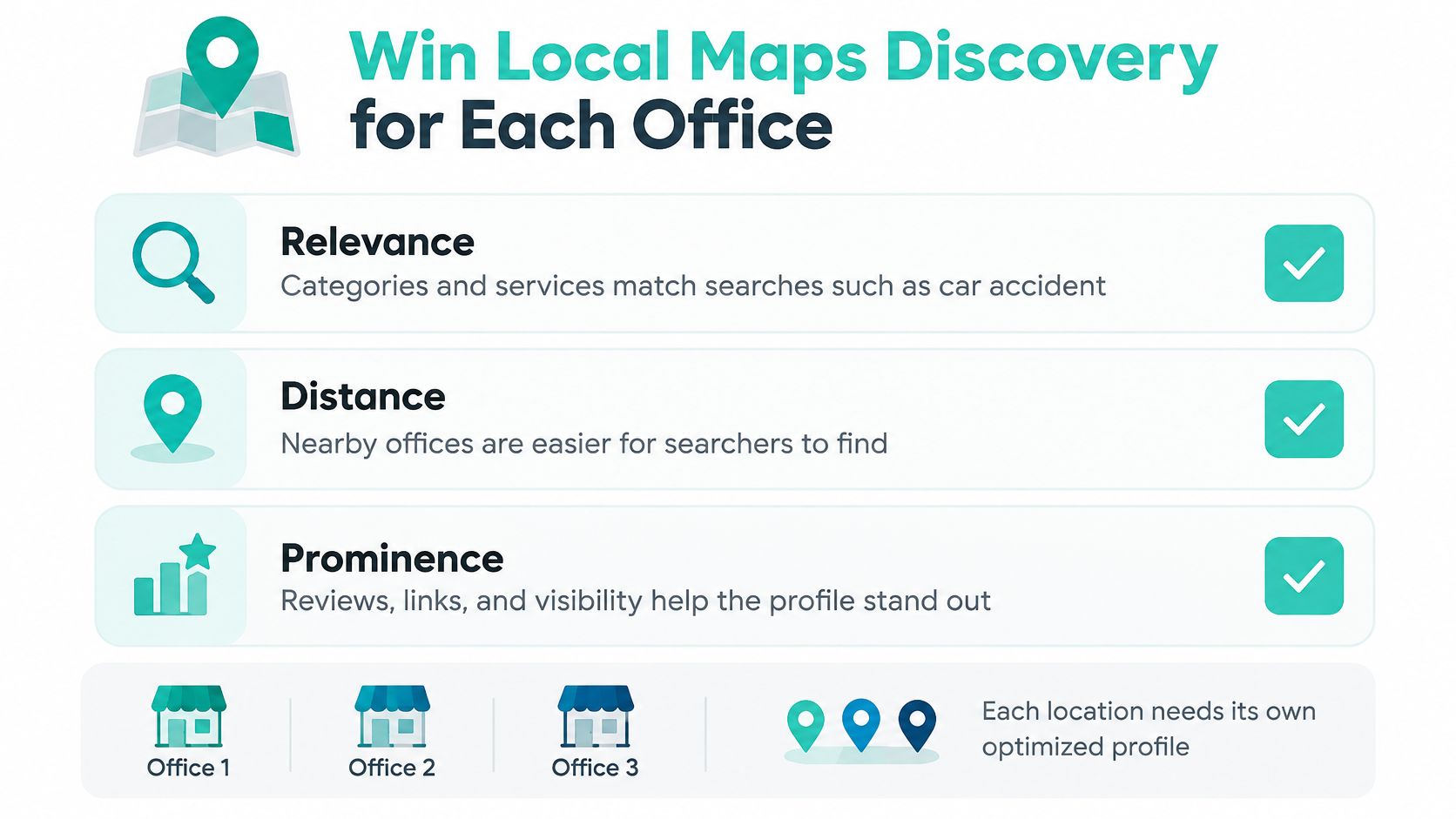
Google's local ranking guidance identifies relevance, distance, and prominence as the primary factors. Relevance concerns how closely the profile matches the search, distance concerns proximity to the searcher or named location, and prominence concerns how well known the business is.
A firm with offices in separate suburbs shouldn't assume a single profile will represent both equally. Audit each genuine office individually, confirm its eligibility before creating a profile, and connect its listing to useful office-specific website content.
Use this visual as a reminder of the local discovery factors.
Audit the details that affect discovery and contact
- Reconcile business details. Match the firm's actual name, address, and phone information across its website, profile, and important directories so visitors and search systems can identify the same office.
- Check categories and services. Select accurate available categories and describe the case types that office handles. Don't add unrelated services to chase more searches.
- Publish truthful hours. Distinguish office availability from after-hours intake arrangements. Someone calling outside office hours needs to know whether they'll reach staff, an answering service, or voicemail.
- Use real office photographs. Show the entrance and recognizable location details so prospective visitors can identify the premises.
- Review the review-request process. Have the firm approve requests under applicable state or provincial requirements. Keep public responses free of confidential information or confirmation of representation.
The Google Business Profile setup and reviews guide for law firms can support the operational checklist. Assign someone responsibility for correcting details when staffing, hours, or office arrangements change.
Treat the profile as an intake destination
A prospective client can call directly from Maps without opening your website. Track those inquiries by office instead of crediting only website forms, and test any tracking number to confirm that it reaches the correct intake route.
Don't create duplicate listings or manufacture local relevance with city pages that merely swap place names. An office page should help someone verify the location, understand its services, and contact the appropriate team.
For machine-readable office information, Google's LocalBusiness documentation supports matching structured data to visible, verifiable business details. Structured data doesn't guarantee rankings or rich-result display. It should describe a real office, not compensate for a thin location page.
Build Fast, Defensible Pages for Injury Intake
Google's Core Web Vitals guidance recommends Largest Contentful Paint within 2.5 seconds, Interaction to Next Paint below 200 milliseconds, and Cumulative Layout Shift below 0.1. For an intake page, those measures describe when the main content appears, how quickly a tap receives a response, and whether elements unexpectedly move.
The performance targets are easier to apply when tied to the contact experience.
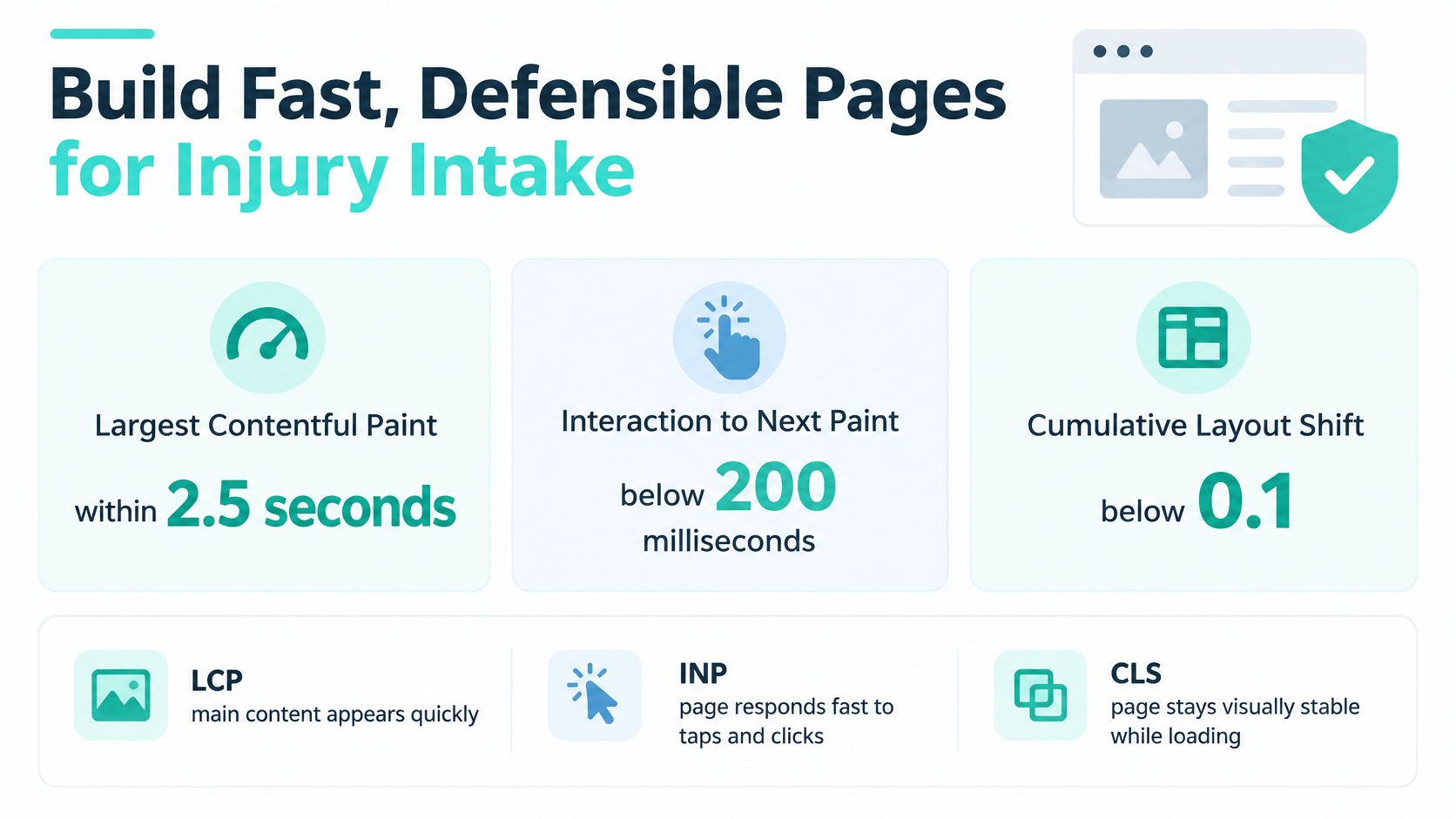
Say someone in pain searches on a phone late at night. A delayed intake form, unresponsive submit button, or shifting call button can obstruct the action they came to take. Test that experience rather than judging the page from a desktop preview.
Fix the contact path before adding decoration
Start with pages already receiving organic visits in Google Search Console, then inspect them in PageSpeed Insights. Review available field data alongside diagnostic recommendations, since a lab test doesn't reproduce every visitor's device or connection.
- Reduce image weight. Compress and appropriately size images rather than sending desktop-sized assets to mobile visitors.
- Reserve layout space. Give images, embedded content, and forms stable dimensions so contact controls don't jump.
- Question third-party scripts. Remove unnecessary widgets and check whether chat, tracking, or form tools delay interaction.
- Test submission and delivery. Confirm that forms work, confirmations appear, and intake receives the inquiry.
The law firm landing page template can help organize a focused contact experience. An organic practice page still needs substantive service information, not just a headline and form.
Make claims defensible before publication
ABA Model Rule 7.1 addresses false or misleading communications, including unjustified expectations and comparisons that can't be substantiated. Remove guaranteed-outcome language and require evidence and context for comparative claims such as best.
Build approved claim fields into page templates, identify the responsible attorney or firm, and route testimonials, credentials, and results through legal review. Keep reviewer names and update dates accurate rather than adding them as decorative trust signals.
Canadian pages need review against the applicable provincial regulator's requirements, not a copied ABA checklist. A disclaimer doesn't make inaccurate substantive copy acceptable.
How Traffic Becomes Qualified Calls in Practice
Consider a hypothetical slip-and-fall visitor who reads a premises liability guide, follows its service link, and calls after 6 p.m. Log the originating page where attribution is available, but wait for intake to establish case fit before counting a qualified inquiry.
The call is the start of evaluation, not proof of a retained matter.

A hypothetical truck accident searcher might instead discover an office in Maps, request directions, and later submit a form with the accident date and location. Those are separate signals. Unless the records can be reliably connected, don't claim that the direction request caused the form submission.
A car accident form can also sit unanswered until the next business day passes. That submission is an inquiry awaiting review, not a qualified lead, and the problem may be follow-up rather than the practice page.
Separate engagement from case fit
Signals that traffic is becoming qualified calls
| Signal | What it looks like | Where to track it |
|---|---|---|
| Maps tap-to-call | Call from the office profile | Call tracking by office |
| Practice page form | Intake form with accident date and location | Form source by page |
| Consultation booked | Intake review confirms a meeting | Intake log by office |
| Retained matter | Signed engagement after consultation | Case management record |
| Branded search growth | More searches for the firm name | Google Search Console and Maps insights |
For branded search, use Search Console to inspect firm-name queries and Business Profile performance for available search and interaction signals. Neither tool alone proves how someone first learned about the firm.
Apply a consistent definition of case fit across offices using the practical lead-scoring guide for lawyers. Record acceptance reasons and exclusions without pushing confidential case details into analytics tools.
This video offers additional marketing context.
Connect attribution with intake review
Our connected marketing process uses ads to create the first opportunity, a landing page to explain the next step, content to provide context, and follow-up to keep the conversation moving. Keep paid and organic attribution distinct even when they share intake infrastructure.
Also check whether persuasive copy attracts inquiries through misleading expectations. California's current Rule 7.1 explains that a truthful statement can still mislead when necessary context is omitted. For a claim such as millions recovered, document the recovery basis, period, firm's role, and appropriate past-results qualification before approval.
Compare qualified inquiries and booked consultations by office, with monthly counts viewed against the previous quarter. Investigate response failures and case mix before rewriting a page because sessions changed.
Confirm Your Next Step Before Your Next Campaign
Audit your accepted case list against the case-page table, then confirm that every genuine office's profile matches its website information. Prioritize missing pages for work the firm wants and has capacity to handle.
Before publishing, assign the people and processes that make measurement useful:
- An approval owner. Name someone who can supply business information, resolve questions, and approve changes.
- An inquiry response process. Set an internal target of responding within one business day, with clear ownership when the usual team member is unavailable.
- A feedback route. Share lead quality, consultation outcomes, and retained-matter information with marketing.
Preserve a baseline you can compare
Record qualified calls and booked consultations by office before making changes. Use the law firm marketing ROI guide to connect spending and outcomes without treating every inquiry as revenue.
Preserve search context too. Month17's resource on how to archive GSC performance history is useful when planning longer-term comparisons, though search records don't replace intake outcomes.
Decision standard: Change the page when the evidence points to a page problem, not merely because a ranking moved.
Set a review date now. Allow time for organic content to develop, and compare the same offices, case categories, and intake definitions when you review the baseline.
SimpleLab Digital offers SEO/GEO, website maintenance, content, landing pages, and connected follow-up support for law firms. Visit SimpleLab Digital to plan injury-specific page clusters, clarify each office's contact path, and align reporting with qualified inquiries and booked consultations.